
Description
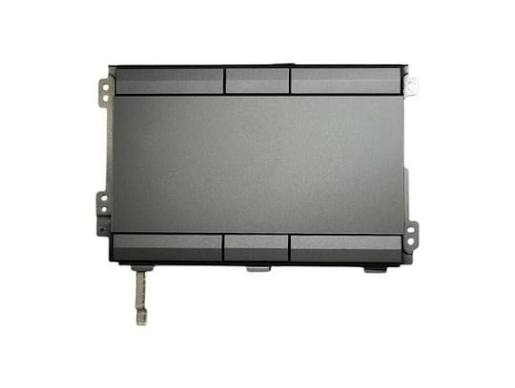
The ZBook touchpad provides convenient cursor control, clicking, scrolling and multi-touch navigation without an external mouse. This replacement component is designed for compatible HP ZBook Fury 17 G8 mobile workstations with a damaged, faulty or unresponsive clickpad.
The laptop uses an integrated touchpad assembly, with different replacement versions depending on whether the original configuration includes NFC.
Replacement Touchpad Features
- Internal laptop touchpad assembly
- Integrated clickpad functionality
- Supports cursor movement, tapping and scrolling
- Available in NFC and non-NFC versions
- Designed for compatible HP ZBook Fury 17 G8 configurations
Common Signs Your Touchpad Needs Replacement
Your laptop may need a new touchpad if you experience:
- Cursor movement that becomes erratic or unresponsive
- Clicking that fails or works intermittently
- Touch gestures that stop functioning
- A touch surface that does not respond to finger movement
- Physical damage or a cracked touchpad surface
- Inconsistent operation despite correct software settings
However, similar problems can result from a damaged touchpad cable, loose connection, driver issue or motherboard fault. Therefore, proper diagnosis helps establish whether the touchpad itself needs replacement.
Check the Correct Replacement Version
HP’s maintenance documentation identifies two versions:
- M75663-001: For models equipped with NFC; includes the NFC antenna.
- M36390-001: For models without NFC capability.
The touchpad kit does not include the touchpad bracket or cable. HP lists the touchpad cable in Cable Kit M20105-001, while the bracket is not available separately as an HP spare part.
Before ordering, confirm:
- Whether your laptop has NFC capability
- The original touchpad part number
- Touchpad cable condition and connector compatibility
- The original mounting arrangement
- Whether the NFC antenna is required
For technical identification, visit the official HP ZBook Fury 17 G8 support page. You can also watch HP’s official touchpad replacement and laptop servicing video, which demonstrates the replacement procedure.
Luztech can help identify suitable replacement options for different supported configurations. Always match the new component to the original part number and laptop specification.
Why Choose Luztech?
At Luztech, we help customers in Kenya find compatible laptop spare parts and repair solutions.
- Assistance identifying the correct replacement version
- Support with HP part-number matching
- Options for different supported laptop configurations
- Laptop touchpad and keyboard-related repair support
- Guidance on related cables and mounting components
Order Your Replacement Touchpad
Restore accurate cursor control and comfortable navigation with a compatible replacement from Luztech.
Contact us in Kenya with your laptop model or original part number. We can help you identify whether you need the NFC or non-NFC version before ordering.


Reviews
There are no reviews yet.