
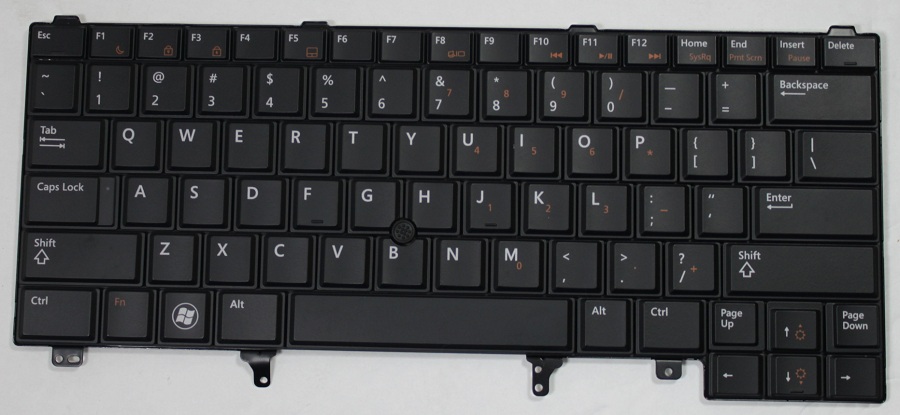
Description
Restore comfortable and reliable typing with a Dell Latitude E6440 keyboard replacement from Luztech. If your laptop has unresponsive keys, missing keycaps, liquid damage or a faulty keyboard, replacing the damaged component can help bring back normal typing functionality.
Compatible Dell Latitude E6440 Keyboard
This replacement keyboard is designed for the Dell Latitude E6440 laptop. It is suitable for customers looking to replace a damaged, worn-out or malfunctioning built-in keyboard.
The E6440 supports different keyboard layouts, including US, UK, Brazilian and Japanese configurations. Therefore, check the required layout before ordering to ensure the key arrangement matches your preference. <Cite refs={[“turn235963search9”]}/>
Signs You Need a Keyboard Replacement
Consider replacing your laptop keyboard if you experience:
- Certain keys not responding when pressed
- Missing, loose or broken keycaps
- Repeated or incorrect characters during typing
- Keyboard damage caused by liquid spills
- Sticky keys that remain difficult to use after cleaning
- A completely unresponsive built-in keyboard
However, keyboard problems can sometimes originate from the keyboard ribbon cable or motherboard connection. A proper diagnosis can help identify the cause before replacement.
Keyboard Compatibility and Installation
Before ordering, confirm the keyboard layout, physical dimensions, mounting points and ribbon cable connector. Additionally, compare the original keyboard’s part number where available.
Dell’s replacement procedure involves removing the battery and keyboard trim, loosening the keyboard screws, and disconnecting the keyboard cable from the system board. The replacement is then connected and secured in position.
For installation guidance, refer to the official Dell Latitude E6440 keyboard removal instructions and keyboard installation guide.
Why Choose Luztech?
At Luztech, we help customers find compatible laptop keyboards and replacement components for their specific devices. We can assist with checking the correct keyboard layout and connector before purchase.
Explore more laptop spare parts at Luztech or learn about our laptop and computer repair services in Nairobi.
Contact Luztech today for a Dell Latitude E6440 keyboard replacement. Share your preferred keyboard layout or a photo of your original keyboard so we can help identify the right fit.


Reviews
There are no reviews yet.