
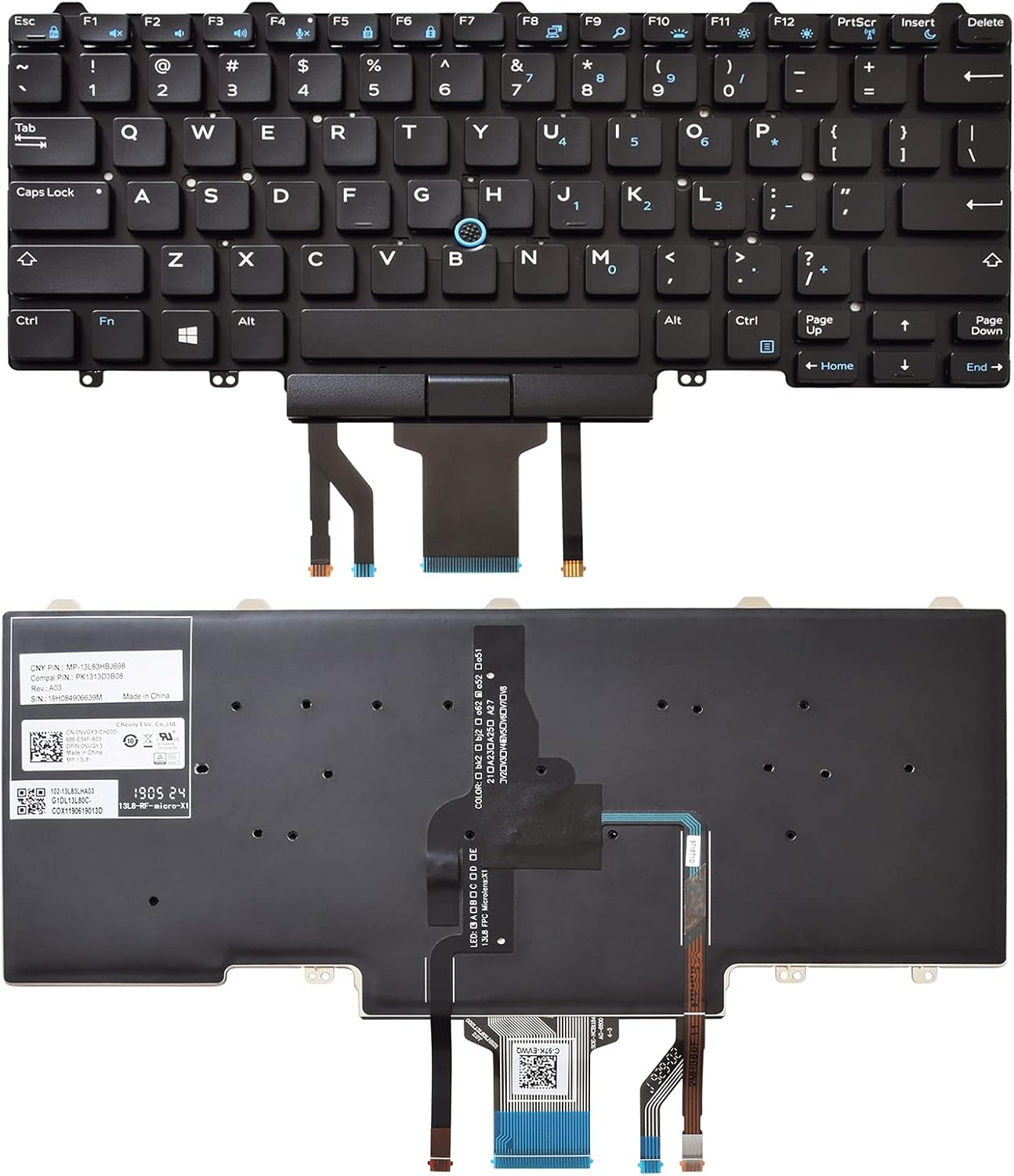
Description
Looking for a reliable Dell Latitude E5480 keyboard replacement in Nairobi? Luztech helps you find a compatible internal keyboard for your Dell laptop. Whether some keys have stopped working, the keyboard has suffered liquid damage or the keys are physically worn, we can help you identify a suitable replacement.
The Latitude E5480 uses an internally fitted keyboard connected through ribbon cables. In addition, compatible versions are available with different layouts and backlight options. Therefore, checking the original keyboard configuration is important before ordering.
Compatible Dell Latitude E5480 Keyboard Options
This replacement is intended for supported Dell Latitude E5480 configurations, including:
- Backlit keyboard versions.
- Non-backlit keyboard versions.
- English US and other available regional layouts.
- Compatible keyboard versions with different pointing features.
Some replacement keyboards may carry part references such as F2X80, D19TR and D18TV. However, these are identification examples and should not be treated as universal part numbers.
Keyboard Features and Specifications
Depending on the supplied version, features may include:
- Keyboard Type: Internal laptop keyboard.
- Colour: Black, depending on the version.
- Backlight: Backlit or non-backlit.
- Layout: English US, English International and other available layouts.
- Connection: Internal ribbon cable.
- Pointing Feature: Available on selected keyboard versions.
- Compatibility: Dell Latitude E5480, subject to part-number and configuration matching.
Checking Keyboard Compatibility
Luztech assists with keyboard options for supported E5480 specifications. Nevertheless, different versions may have different ribbon connections, layouts and physical arrangements.
Before ordering, check:
- Your exact laptop model.
- Original Dell part number or DP/N.
- Backlit or non-backlit design.
- Keyboard language and key arrangement.
- Ribbon cable and connector configuration.
- Keyboard frame and mounting points.
- Pointing-stick features, where applicable.
This helps ensure that the replacement matches your original keyboard rather than relying on the model name alone.
Signs You Need a Replacement Keyboard
Consider replacing your keyboard if:
- Some keys no longer respond.
- Keys type incorrect characters.
- Several keys work intermittently.
- The keyboard has missing or broken keys.
- Liquid spills have affected typing.
- The keys have become excessively worn.
- The backlight has stopped working on a backlit version.
However, a faulty ribbon cable, connector or motherboard can also cause keyboard problems. A proper inspection helps identify the cause before replacing the component.
Keyboard Replacement and Repair Support
The keyboard is installed inside the laptop and requires careful removal of the keyboard trim, screws and internal ribbon connections. Dell provides model-specific instructions for this procedure.
For reference, visit the official Dell Latitude 5480 keyboard removal guide or watch Dell’s Latitude 5480 keyboard replacement video.
Luztech can help identify a compatible replacement and provide laptop keyboard replacement assistance in Nairobi.
Why Choose Luztech?
Luztech helps customers in Kenya source compatible Dell laptop keyboards and replacement components.
- Assistance with keyboard part-number identification.
- Backlit and non-backlit replacement options.
- Help checking keyboard layouts and connectors.
- Laptop keyboard replacement support.
- Access to laptop spare parts and repair services in Nairobi.
Explore our Laptop Spare Parts, Laptop and Computer Repair Services in Nairobi and Luztech Laptop and Computer Shop.
Order Your Replacement Keyboard in Nairobi
Need a compatible keyboard for your Dell Latitude E5480? Contact Luztech with your laptop model and, preferably, a photograph of the original keyboard or its part-number label.
We will help identify the correct version and check availability.
Luztech – Dell Laptop Keyboards, Spare Parts and Repair Services in Nairobi, Kenya.


Reviews
There are no reviews yet.