
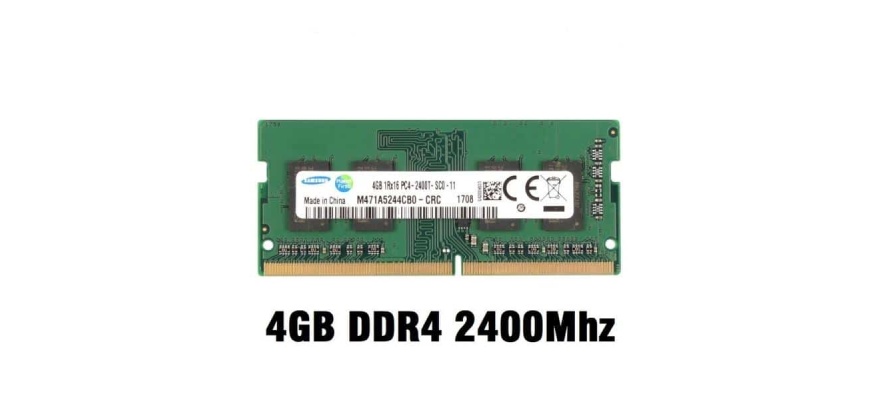
Laptop RAM Upgrade and Replacement in Nairobi | Luztech Computer Solutions
Is your laptop or desktop computer running slowly, freezing when you open several applications, or struggling to handle demanding software? Upgrading the Random Access Memory (RAM) may help improve performance when your computer is running short of available memory.
Luztech Computer Solutions provides RAM upgrade, replacement, compatibility checks, and computer memory support in Nairobi CBD. We assist customers looking for RAM for laptops, desktop computers, workstations, and selected server systems.
Whether you use an HP, Dell, Lenovo, ASUS, Acer, Toshiba, or another compatible computer brand, we can help you identify suitable memory for your device. We also assist with enquiries about Apple MacBook memory, although many newer MacBook models have RAM integrated into the system and cannot be upgraded after purchase.
Browse our available products in the Laptop RAM and Memory Category.
Need a RAM upgrade or replacement in Nairobi? Call or WhatsApp Luztech Computer Solutions on 0702 981 367.
What Is RAM and Why Is It Important?
Random Access Memory (RAM) is the computer’s temporary working memory. It stores data and instructions that the processor needs to access quickly while programs are running.
RAM helps your computer manage open applications, browser tabs, documents, games, and other active tasks. When available memory becomes insufficient, the operating system may rely more heavily on storage to manage active data, which can make the computer feel slower.
Adding more RAM can improve responsiveness and multitasking when memory capacity is the limiting factor. However, RAM upgrades do not automatically fix every performance problem. A slow computer may also need an SSD upgrade, software maintenance, malware checks, cooling repairs, or other diagnostics.
Signs Your Computer May Need a RAM Upgrade
1. Slow Performance and Delayed Response
If applications take longer to respond, your browser slows down with multiple tabs open, or switching between programs becomes difficult, your computer may be running low on memory.
Possible solution: Check memory usage while using your normal applications. If RAM is consistently near capacity, a compatible upgrade may improve responsiveness.
2. Frequent Freezing During Multitasking
Running a browser, Microsoft Office, communication software, and other applications simultaneously can consume considerable memory.
Possible solution: A RAM upgrade may allow the computer to handle more applications at the same time without relying as heavily on storage-based memory management.
3. Difficulties With Professional Applications
Video editing, graphic design, software development, virtual machines, data analysis, and other demanding workloads can require substantial memory.
Possible solution: Determine the RAM requirements of your applications and check the computer’s maximum supported capacity before upgrading.
4. Gaming Lag and Stuttering
Insufficient RAM can contribute to stuttering, slow transitions, and performance problems in games. However, gaming performance also depends on the processor, graphics card, storage, cooling system, and game settings.
Possible solution: Check the game’s memory requirements and your computer’s existing configuration. An upgrade can help when system memory is the bottleneck, but it will not replace a more powerful graphics card.
5. Problems Running Virtual Machines and Development Tools
Software developers and technical users may need to run code editors, local servers, databases, emulators, or virtual machines simultaneously.
Possible solution: Increasing RAM capacity can provide more working memory for these tasks, provided the processor and motherboard support the required configuration.
6. Insufficient Memory for Newer Software
New applications and operating systems may require more memory than older software. A computer with insufficient RAM may struggle to run several modern applications together.
Possible solution: Check the requirements of the software you intend to use and determine whether your device supports a practical memory upgrade.
7. Computer Freezing or Crashing
Memory shortages can cause slowdowns and application failures. However, faulty RAM, overheating, damaged storage, driver problems, and motherboard faults can also cause freezes and crashes.
Possible solution: Have the computer diagnosed before buying replacement memory, especially if the problem occurs even when only a few applications are running.
Laptop RAM Upgrade and Replacement in Nairobi
Laptop RAM comes in different generations, capacities, speeds, and physical formats. Most upgradeable laptops use compact SO-DIMM memory modules, while some newer devices use soldered memory that cannot be replaced as a standard module.
At Luztech Computer Solutions, we help customers identify compatible memory for supported laptop models.
Our laptop memory services include:
-
Replacing faulty or damaged RAM modules.
-
Checking memory compatibility and supported speeds.
-
Diagnosing memory-related startup problems.
-
Testing installed RAM where applicable.
-
Assisting with memory upgrades for selected business and gaming laptops.
Before purchasing RAM, confirm the exact laptop model, memory generation, maximum supported capacity, available slots, and whether the existing memory is removable.
Desktop Computer and Workstation RAM
Desktop computers commonly use full-size DIMM memory modules. Depending on the motherboard and processor, compatible systems may support DDR3, DDR4, or DDR5 memory.
Workstations used for engineering, design, rendering, software development, and data-intensive applications may require higher capacities or specialised memory configurations.
Before upgrading a desktop or workstation, check:
-
The motherboard’s supported RAM generation.
-
The maximum supported memory capacity.
-
The number of available memory slots.
-
Supported module capacities and memory speeds.
-
Whether ECC or registered memory is required.
-
The memory configuration recommended for the processor and motherboard.
Desktop and workstation memory is not universally interchangeable. The correct module depends on the system’s specifications.
Server RAM Upgrade and Replacement
Servers often require memory configurations designed for reliability and sustained workloads. Depending on the server platform, compatible memory may include ECC UDIMM, ECC RDIMM, or other supported server-memory types.
Server RAM may be used in file servers, business applications, virtualisation systems, databases, and other enterprise environments.
Before replacing or upgrading server memory, verify the server model, processor configuration, memory population rules, supported module types, and capacity limits. Registered and unbuffered memory are not interchangeable in every system.
Contact Luztech Computer Solutions to enquire about compatible memory and RAM-related support for selected server systems.
Understanding RAM Types: DDR2, DDR3, DDR4 and DDR5
RAM generations differ in electrical design, speed, capacity support, and compatibility.
-
DDR2 / PC2: An older memory generation used in legacy computers.
-
DDR3 / PC3: Found in many older laptops and desktop computers.
-
DDR3L / PC3L: A lower-voltage DDR3 variant supported by certain systems.
-
DDR4 / PC4: Common in many business laptops, desktops, and workstations.
-
DDR5 / PC5: A newer generation used in supported modern computers.
The PC2, PC3, PC4, and PC5 labels broadly correspond to DDR2, DDR3, DDR4, and DDR5 memory respectively. Different generations have different physical notches and electrical requirements, so they cannot simply be substituted for one another.
What Does RAM Speed Mean?
Memory speed is commonly advertised in MT/s, although MHz is frequently used in product descriptions. Examples include DDR3-1600, DDR4-2666, DDR4-3200, and DDR5-4800.
The speed at which memory operates depends on the module and the supported settings of the processor and motherboard. Installing a faster-rated module does not guarantee that the computer will run it at its advertised maximum speed.
How Much RAM Does Your Computer Need?
The right RAM capacity depends on your operating system, applications, workload, and device limitations.
| RAM capacity | Typical use |
|---|---|
| 4GB | Basic or older systems with light workloads; limited for many modern multitasking needs |
| 8GB | Everyday browsing, documents, schoolwork, and basic office use |
| 16GB | More comfortable multitasking, business applications, and many general productivity workloads |
| 32GB | Demanding applications, larger projects, advanced multitasking, and selected gaming or creative workloads |
| 64GB or more | Professional workloads, virtual machines, specialised workstations, and supported server configurations |
These are general guidelines, not guarantees. Some applications require more memory, and certain devices cannot support the capacities listed.
Apple MacBook RAM Upgrade and Replacement
MacBook memory requirements differ significantly by model and generation.
Some older MacBook models have removable RAM modules and may support memory upgrades. Many newer MacBook Air and MacBook Pro models use unified memory or memory soldered to the logic board, which cannot be upgraded using a conventional RAM module after purchase.
If your MacBook is running slowly, we can help assess possible causes and discuss available maintenance or upgrade options. Depending on the model, practical improvements may include storage upgrades on supported devices, software optimisation, or repair of other performance-related faults.
Always confirm the exact MacBook model and its memory architecture before planning an upgrade.
RAM Compatibility for HP, Dell, Lenovo, ASUS and Acer
Luztech Computer Solutions accepts enquiries for compatible RAM for a wide range of computer brands, including:
-
HP: Selected Pavilion, ProBook, EliteBook, Envy, OMEN, desktop, and workstation models.
-
Dell: Selected Inspiron, Latitude, Vostro, Precision, OptiPlex, and other supported models.
-
Lenovo: Selected ThinkPad, ThinkBook, IdeaPad, ThinkCentre, and workstation models.
-
ASUS: Selected VivoBook, ZenBook, TUF Gaming, ROG, and desktop models.
-
Acer: Selected Aspire, Swift, Nitro, Predator, and desktop models.
-
Other brands: Enquiries for Toshiba, Fujitsu, Sony, Samsung, and other compatible systems.
Availability varies by model and stock. The brand name alone is not enough to establish RAM compatibility; the exact model and specifications must be checked.
RAM Upgrade and Replacement Prices in Nairobi
RAM prices vary according to memory generation, capacity, speed, module type, brand, and availability. Server memory and specialised workstation modules may cost more than standard consumer RAM.
Rather than relying on a fixed price list that may become outdated, contact Luztech Computer Solutions for current pricing on the capacity and memory type compatible with your device.
For a more accurate quotation, provide:
-
Your computer brand and full model number.
-
Your current RAM capacity, if known.
-
The capacity you want to upgrade to.
-
Your computer’s existing RAM type or module details, if available.
-
Whether you need the memory module only or installation and testing as well.
We can then help you identify the appropriate option based on compatibility and your intended workload.
Why Choose Luztech Computer Solutions?
Assistance with compatibility: We help identify memory suitable for your computer model instead of relying on capacity or brand alone.
Support for different computer types: Enquire about RAM for compatible laptops, desktops, workstations, and selected servers.
Diagnosis before replacement: We help investigate whether poor performance is related to memory capacity, faulty RAM, or another component.
Installation and testing: Ask about installation and testing services for supported systems.
Convenient Nairobi CBD location: Visit our shop for enquiries about RAM, laptop spare parts, upgrades, and computer repairs.
After-sales support: Confirm the applicable warranty and service terms when purchasing RAM or arranging an installation.
Where to Buy RAM or Upgrade Your Computer in Nairobi
Visit Luztech Computer Solutions to enquire about laptop RAM, desktop memory, workstation modules, and compatible replacement parts.
Business: Luztech Computer Solutions
Location: Rehimtulla Trust Building, 2nd Floor, Shop 27B, Moi Avenue, Nairobi CBD, opposite Bihi Tower.
Call or WhatsApp: 0702 981 367
Browse our Laptop RAM and Memory Products to explore available options.
Frequently Asked Questions
1. Will upgrading RAM make my laptop faster?
It can improve performance when insufficient memory is causing slowdowns. If the problem is a slow hard drive, overheating, malware, or an older processor, a different solution may be needed.
2. Can I mix different RAM capacities?
Some computers support modules of different capacities, but compatibility and performance depend on the motherboard, processor, and memory configuration. Matching modules is often preferable where practical.
3. Can I install DDR4 RAM in a DDR3 laptop?
No. DDR3 and DDR4 have different physical and electrical specifications and are not interchangeable.
4. Can every laptop RAM be upgraded?
No. Some laptops have soldered memory, while others have removable modules or a combination of soldered memory and an available slot. Check the exact model before purchasing RAM.
5. Does more RAM improve gaming?
More RAM may help if a game is running out of system memory. Gaming performance also depends on the graphics processor, CPU, storage, cooling, and game settings.
6. Can MacBook Pro RAM be upgraded?
Some older models support module replacement or upgrades, but many newer MacBook Pro models have integrated memory that cannot be upgraded conventionally. Model-specific verification is essential.
7. Do you provide RAM installation in Nairobi?
Contact Luztech Computer Solutions to confirm installation availability, compatibility checks, testing, and current service charges.
Give your computer the memory it needs. Contact Luztech Computer Solutions on 0702 981 367 for RAM upgrade and replacement enquiries in Nairobi.
