
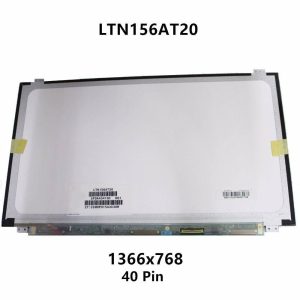
 New Replacement Asus X550 LED LCD Display Laptop Screen in Nairobi 15.6 inch Screen Connector : 40 Pins Maximum Resolution : 1366*768
The HP EliteBook 830 G5 is a popular business laptop designed for professionals, students, offices and everyday users who need a compact and reliable computer. Like any laptop that has been used for several years, the HP EliteBook 830 G5 can eventually develop problems involving the screen, keyboard, battery, motherboard, BIOS, CMOS battery, touchpad, casing, hinges, charging system, ports, storage, memory, operating system or cooling system.
If your HP EliteBook 830 G5 is damaged, slow, overheating, refusing to power on, not charging or experiencing hardware problems, replacing the entire laptop may not always be necessary. Many HP EliteBook 830 G5 problems can be repaired or resolved by replacing the faulty component or upgrading the appropriate hardware.
HP EliteBook 830 G5 screen replacement

A damaged screen is one of the most noticeable laptop problems. An HP EliteBook 830 G5 may develop a cracked display, black screen, flickering image, vertical or horizontal lines, dark areas, distorted colors or an intermittent display.
Screen replacement may be required when the LCD panel is physically damaged.
However, not every display problem requires replacing the screen. A faulty display cable, loose connector, motherboard problem or another component can produce similar symptoms.
A proper diagnosis should therefore be carried out before installing a replacement screen.
Common HP EliteBook 830 G5 screen problems include:
- Cracked LCD
- Broken display
- Black screen
- Flickering screen
- Lines across the display
- Dim screen
- White screen
- Display going off intermittently
- Display problems when moving the laptop lid
- Damaged screen caused by impact or pressure
HP EliteBook 830 G5 keyboard replacement

The keyboard is another component that can wear out through regular use. Individual keys can stop working, become loose or break, while liquid spills can damage the keyboard and sometimes affect other internal components.
HP EliteBook 830 G5 keyboard replacement may be necessary when:
- Several keys do not work
- Individual keys are broken
- The keyboard types incorrect characters
- Keys are sticking
- Liquid has entered the keyboard
- The keyboard has physical damage
- The keyboard works intermittently
- The keyboard has suffered electrical damage
A professional keyboard replacement ensures the keyboard is properly fitted and tested.
HP EliteBook 830 G5 battery replacement

Laptop batteries naturally lose capacity as they age.
An HP EliteBook 830 G5 with an old or worn battery may have a short battery runtime, shut down unexpectedly or show battery-related warnings.
Signs that your battery may need replacement include:
- Battery draining quickly
- Laptop shutting down without warning
- Battery not charging
- Laptop working only when connected to the charger
- Battery percentage dropping rapidly
- Battery health significantly reduced
- Battery swelling or physical deformation
A swollen battery should be treated seriously because it can place pressure on the laptop casing and internal components.
HP EliteBook 830 G5 motherboard repair

The motherboard is one of the most important components in the laptop. It connects and controls many of the computer’s major systems.
Motherboard faults can result in:
- No power
- No charging
- No display
- USB ports not working
- Keyboard or touchpad problems
- Unexpected shutdowns
- Failure to boot
- Short circuits
- Intermittent operation
Motherboard repair should be performed after proper diagnosis because symptoms can sometimes be caused by a smaller replaceable component.
Depending on the fault, motherboard repair may involve component-level troubleshooting, connector repair, power circuit diagnosis, charging circuit repair or replacement of damaged components.
HP EliteBook 830 G5 BIOS reprogramming
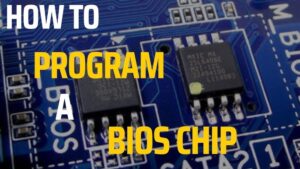
The BIOS is responsible for important low-level functions that allow the laptop hardware to initialize and start the operating system.
BIOS-related problems can sometimes cause:
- Laptop not booting
- BIOS corruption
- Failed BIOS update
- Startup errors
- Incorrect hardware detection
- Repeated BIOS recovery
- No display during startup
- Firmware-related boot problems
HP EliteBook 830 G5 BIOS reprogramming may be required when the BIOS firmware is corrupted or cannot be restored through normal recovery procedures.
BIOS work should be carried out carefully because incorrect firmware or an interrupted programming process can cause additional problems.
HP EliteBook 830 G5 CMOS battery replacement

The CMOS battery helps maintain certain firmware settings and system information when the main laptop battery is disconnected or the computer is powered off.
A weak CMOS battery can result in:
- Date and time resetting
- BIOS settings not being retained
- CMOS-related warnings
- Startup messages
- Firmware configuration problems
Replacing the CMOS battery can resolve these issues when the battery has reached the end of its service life.
If CMOS problems continue after battery replacement, further BIOS or motherboard diagnosis may be required.
HP EliteBook 830 G5 touchpad repair
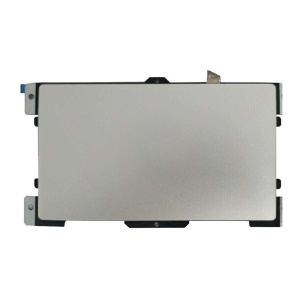
The touchpad provides built-in cursor control without requiring an external mouse.
An HP EliteBook 830 G5 touchpad may develop problems such as:
- Cursor not moving
- Touchpad buttons not working
- Intermittent response
- Touchpad clicking incorrectly
- Touchpad becoming unresponsive
- Physical touchpad damage
A technician can determine whether the touchpad needs repair, replacement or software troubleshooting.
HP EliteBook 830 G5 casing replacement

The laptop casing protects internal components and provides structural support for the display, keyboard, motherboard and other hardware.
Physical damage can occur after drops, impacts, excessive pressure or prolonged use.
Casing problems can include:
- Cracked palmrest
- Broken bottom cover
- Damaged display cover
- Broken screw mounts
- Damaged hinge mounts
- Loose casing
- Missing or broken plastic sections
HP EliteBook 830 G5 casing replacement can restore the laptop’s structural condition and improve protection for the internal components.
HP EliteBook 830 G5 hinge repair

The hinges allow the display to open and close while keeping it securely positioned.
Damaged or stiff hinges can cause serious problems if left unattended.
Signs of hinge problems include:
- Screen becoming loose
- Difficulty opening the laptop
- Cracking sounds
- Display casing separating
- Uneven screen movement
- Broken hinge mounts
- Pressure on the LCD panel
- Display cable damage
Hinge repair or replacement can help prevent additional damage to the display assembly.
If the hinge mounting points in the casing are also broken, the casing may need repair or replacement.
HP EliteBook 830 G5 charging problem repair

A laptop that does not charge can have several possible causes.
The problem may involve:
- AC adapter
- Charging connector
- DC-in circuit
- Charging IC
- Motherboard
- Battery
- Power-management circuitry
Common symptoms include:
- Charger connected but battery not charging
- Charging works intermittently
- Laptop says “plugged in” but battery percentage does not increase
- Charger connection is loose
- Laptop shuts down when the charger is removed
- Charging stops when the cable is moved
Proper diagnosis is important because replacing the battery or charger will not solve a motherboard charging-circuit fault.
HP EliteBook 830 G5 power problem repair

A completely dead HP EliteBook 830 G5 can be caused by several hardware problems.
Possible causes include:
- Faulty power adapter
- Battery fault
- Charging circuit problem
- Power button problem
- Motherboard fault
- Short circuit
- Damaged internal component
- Firmware or BIOS problem
If the laptop shows no lights, no fan activity and no response when the power button is pressed, professional diagnosis is recommended.
Power-related repairs should begin with testing the adapter, input power, battery and motherboard power circuits.
HP EliteBook 830 G5 USB port repair
A USB port may become damaged through physical force, repeated use, dust, corrosion or electrical faults.
Common USB problems include:
- USB device not detected
- Loose USB port
- Broken connector
- Intermittent connection
- USB port physically damaged
- USB device disconnecting
- USB port not supplying power
Depending on the fault, repair may involve connector replacement, soldering, circuit repair or motherboard-level troubleshooting.
HP EliteBook 830 G5 HDMI port repair
The HDMI port allows the laptop to connect to compatible external displays such as monitors and televisions.
An HDMI problem may occur when the port is physically damaged or the display circuit has developed a fault.
Symptoms can include:
- External monitor not detected
- No HDMI output
- Intermittent display
- Loose HDMI connector
- Damaged HDMI port
- External display showing an unstable image
If the HDMI connector is physically damaged, replacement or motherboard-level repair may be necessary.
HP EliteBook 830 G5 SSD upgrade

Upgrading the storage can improve the overall responsiveness and available storage capacity of the laptop.
An SSD upgrade can be useful if the current drive is:
- Too small
- Slow
- Failing
- Nearly full
- Causing operating-system problems
Before an SSD upgrade, important data should be backed up.
Depending on the existing configuration and intended upgrade, the storage can be replaced with a compatible SSD and the operating system and user data can then be transferred or reinstalled.
An SSD upgrade can improve:
- Windows startup time
- Application loading
- File access
- General system responsiveness
- Available storage
HP EliteBook 830 G5 RAM upgrade

RAM affects the laptop’s ability to handle multiple applications and workloads simultaneously.
If your HP EliteBook 830 G5 becomes slow when several programs or browser tabs are open, increasing the available RAM may improve multitasking performance, provided the system supports the desired configuration.
A RAM upgrade can be useful for:
- Office applications
- Web browsing
- Programming
- Business software
- Remote work
- Multitasking
- General productivity
The correct compatible memory specification should be confirmed before purchasing or installing an upgrade.
HP EliteBook 830 G5 operating system repair
Windows-related problems can make a laptop slow, unstable or unable to boot.
Common operating-system problems include:
- Windows not starting
- Startup errors
- Corrupted system files
- Frequent crashes
- Blue screen errors
- Slow Windows performance
- Driver problems
- Failed Windows updates
- Software conflicts
Operating system repair can involve troubleshooting Windows, repairing system files, fixing boot problems, reinstalling drivers or performing a clean installation when necessary.
Important personal files should be backed up before major operating-system work.
HP EliteBook 830 G5 overheating repair
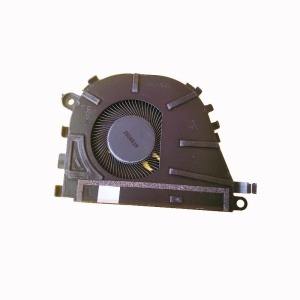
Overheating is another common issue in older laptops.
An HP EliteBook 830 G5 may become hot because of:
- Dust accumulation
- Blocked air vents
- Dirty cooling fan
- Dried thermal compound
- Fan failure
- Heavy processor workload
- Poor airflow
- Internal cooling-system problems
Overheating can cause:
- Slow performance
- Fan running continuously
- Unexpected shutdowns
- System instability
- Reduced component lifespan
Professional laptop cleaning and cooling-system maintenance can include fan cleaning, heatsink cleaning, thermal compound replacement and inspection of the cooling system.
HP EliteBook 830 G5 complete repair services in Nairobi
Luztech Computer Solutions can assist with a wide range of HP EliteBook 830 G5 repairs and upgrades in Nairobi.
Our HP EliteBook 830 G5 services include:
- Screen replacement
- Keyboard replacement
- Battery replacement
- Motherboard repair
- BIOS reprogramming
- CMOS battery replacement
- Touchpad repair
- Casing replacement
- Hinge repair
- Charging problem repair
- Power problem repair
- USB port repair
- HDMI port repair
- SSD upgrade
- RAM upgrade
- Operating system repair
- Overheating repair
The correct repair depends on the actual condition of the laptop. A diagnosis can help identify the faulty component before replacement or repair work begins.
Why repair an HP EliteBook 830 G5 instead of replacing it?
The HP EliteBook 830 G5 is a business-oriented laptop, and repairing a specific faulty component can sometimes be more practical than replacing the entire computer.
Repair may be worthwhile when:
- The motherboard is still functional
- The laptop has a good processor
- The chassis is in reasonable condition
- The display can be replaced
- Storage or RAM can be upgraded
- The battery can be replaced
- The repair cost is reasonable
A professional assessment can help determine whether repairing or upgrading the laptop is the better option.
HP EliteBook 830 G5 repair in Nairobi

If you are searching for HP EliteBook 830 G5 repair in Nairobi, Luztech Computer Solutions can help diagnose hardware, software, charging, power, display and performance problems.
Whether your laptop needs a new screen, keyboard, battery, motherboard repair, BIOS reprogramming, CMOS battery, touchpad, casing, hinge, charging port, USB port, HDMI repair, SSD, RAM upgrade, Windows repair or cooling-system service, the first step is identifying the actual fault.
Professional diagnosis helps avoid unnecessary component replacement and allows the appropriate repair to be carried out.
Conclusion
The HP EliteBook 830 G5 can experience many different problems as it gets older, but a fault with one component does not necessarily mean that the entire laptop needs to be replaced.
From screen and keyboard replacement to battery, motherboard, BIOS, CMOS, touchpad, casing, hinge, charging, power and port repairs, many components can be repaired or replaced. Storage and RAM can also be upgraded, while operating-system and overheating problems can be addressed through professional maintenance.
Luztech Computer Solutions provides HP EliteBook 830 G5 repair, replacement, upgrade and maintenance services in Nairobi, helping customers keep their laptops working efficiently for longer.
