
HP EliteBook 830 G7, G8, G9, G10 & G11 Repair in Nairobi – Screen, Keyboard, Battery, Charger and Upgrades
Even though these laptops are built for durability, continuous use can eventually lead to hardware faults, component failure, physical damage or performance issues. Common problems include damaged screens, faulty keyboards, weak batteries, charging issues, motherboard faults, BIOS problems, damaged casing, overheating and slow performance.
Luztech Computer Solutions provides HP EliteBook 830 G7, G8, G9, G10 and G11 repair services in Nairobi, including screen replacement, keyboard replacement, battery replacement, compatible 65W charger replacement, motherboard repair, BIOS programming, CMOS battery replacement, touchpad repair, casing repair, hinge repair, charging repair, SSD upgrades, RAM upgrades and operating system repair.
Whether your HP EliteBook 830 is used for business, school, office work or personal computing, repairing and upgrading the existing laptop can often extend its useful life and improve performance.
HP EliteBook 830 G7-G11 Screen Replacement in Nairobi
The screen is one of the most important parts of any laptop because it allows users to view and interact with their work. A damaged display can make the laptop difficult or impossible to use.
HP EliteBook 830 G7, G8, G9, G10 and G11 models may experience screen problems caused by physical damage, aging components, accidental drops, pressure, hinge problems or display cable issues.
Common HP EliteBook 830 screen problems include:
- Cracked LCD screen
- Broken display panel
- Black screen
- Flickering display
- Vertical lines
- Horizontal lines
- Dim screen
- White screen
- Dead pixels
- Display not turning on
- Screen going off when moving the lid
- Distorted colors
- Touchscreen failure (where applicable)
A proper diagnosis is important because not every screen problem requires replacing the LCD panel. Some issues are caused by:
- Faulty display cable
- Loose display connector
- Motherboard display circuit problem
- BIOS or firmware issue
- Graphics-related fault
At Luztech Computer Solutions, the laptop is inspected before replacing the display to ensure the correct repair solution is provided.
HP EliteBook 830 G7-G11 LCD Display Replacement

A damaged LCD panel is one of the most common repairs performed on business laptops.
Screen replacement may be required when the display has:
- Physical cracks
- Ink-like black spots
- Broken internal layers
- Permanent lines
- Severe brightness problems
- No image output
A quality replacement display should match the laptop specifications, including:
- Screen size
- Resolution
- Connector type
- Display technology
- Touch or non-touch configuration
Using the correct compatible screen ensures proper brightness, image quality and reliable operation.
HP EliteBook 830 G7-G11 Keyboard Replacement in Nairobi

The keyboard is another component that receives heavy daily use. After years of typing, keys can wear out, become damaged or stop responding.
HP EliteBook 830 keyboard problems can happen because of:
- Normal wear and tear
- Liquid spills
- Broken key mechanisms
- Dust and debris
- Internal connector problems
- Electrical faults
Common keyboard symptoms include:
- Certain keys not working
- Missing or broken keys
- Keyboard typing wrong characters
- Sticky keys
- Keyboard not detected
- Backlight not working (where applicable)
- Random key presses
HP EliteBook 830 G7, G8, G9, G10 and G11 keyboard replacement involves carefully removing the damaged keyboard and installing a compatible replacement.
A professional repair ensures:
- Correct keyboard fitting
- Proper connector installation
- Full key testing
- Backlight testing where supported
HP EliteBook 830 Keyboard Backlight Repair

Many EliteBook 830 configurations include keyboard backlight functionality.
If the backlight stops working, possible causes include:
- Faulty keyboard
- Backlight circuit problem
- Keyboard connection issue
- BIOS settings
- Motherboard-related fault
Before replacing the keyboard, the backlight system should be tested to determine the actual cause.
HP EliteBook 830 G7-G11 Battery Replacement in Nairobi
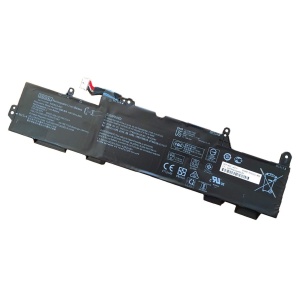
Laptop batteries naturally lose their ability to hold charge over time.
A weak battery can reduce productivity because the laptop may require constant connection to the charger.
Common HP EliteBook 830 battery problems include:
- Battery draining quickly
- Laptop shutting down suddenly
- Battery not charging
- Reduced battery capacity
- Battery percentage dropping rapidly
- Laptop working only with charger connected
- Battery swelling
Battery replacement can restore portability and improve the overall user experience.
Signs your battery may need replacement:
- Battery health is poor
- Runtime is much shorter than before
- The laptop switches off without warning
- The battery cannot maintain charge
A compatible replacement battery should be installed according to the exact EliteBook 830 generation and configuration.
HP EliteBook 830 G7-G11 Battery Health Problems
Before replacing the battery, technicians should check:
- Battery charging cycle count
- Battery health condition
- Charger output
- Charging circuit
- BIOS battery information
- Power management settings
Sometimes battery problems are caused by the charger, charging circuit or software settings rather than the battery itself.
Correct diagnosis prevents unnecessary replacement.
HP EliteBook 830 G7-G11 65W Charger Replacement in Nairobi

A reliable charger is essential for powering and charging the HP EliteBook 830 series.
Many HP EliteBook 830 models use USB-C charging systems, and compatible 65W HP laptop chargers are commonly used for business laptops requiring efficient power delivery.
A faulty charger can cause:
- Laptop not charging
- Battery not increasing percentage
- Intermittent charging
- Charger overheating
- Charging warnings
- Laptop shutting down during use
- Slow charging
Luztech Computer Solutions provides compatible HP EliteBook 830 charger replacement solutions, including 65W USB-C AC adapters where supported.
HP EliteBook 830 65W USB-C AC Adapter Replacement
When replacing an HP EliteBook 830 charger, it is important to confirm:
- Correct wattage
- Correct voltage
- USB-C Power Delivery support
- Connector compatibility
- HP compatibility
- Charger quality
Using an incorrect charger may result in:
- Slow charging
- Charging errors
- Reduced battery performance
- Power instability
A good quality 65W charger provides reliable power for:
- Office work
- Business applications
- Online meetings
- Browsing
- Daily productivity tasks
Common HP EliteBook 830 Charger Problems
Charger not detected
The laptop may show that no charger is connected even when the adapter is plugged in.
Possible causes:
- Faulty charger
- Damaged USB-C port
- Charging circuit fault
- Cable damage
Charger connected but battery not charging
This may be caused by:
- Weak charger output
- Battery failure
- Charging IC problem
- Motherboard fault
Charger overheating
A charger becoming excessively hot may indicate:
- Internal charger failure
- Overloading
- Poor-quality replacement adapter
- Electrical problems
The charger should be tested and replaced if necessary.
Professional HP EliteBook 830 G7-G11 Repair in Nairobi

At Luztech Computer Solutions, HP EliteBook 830 G7, G8, G9, G10 and G11 laptops can be diagnosed and repaired for:
- Screen problems
- Keyboard faults
- Battery issues
- Charger problems
- Charging failures
- Power problems
- Motherboard faults
- BIOS issues
- Performance problems
Proper diagnosis helps identify the exact faulty component before replacement or repair.
