
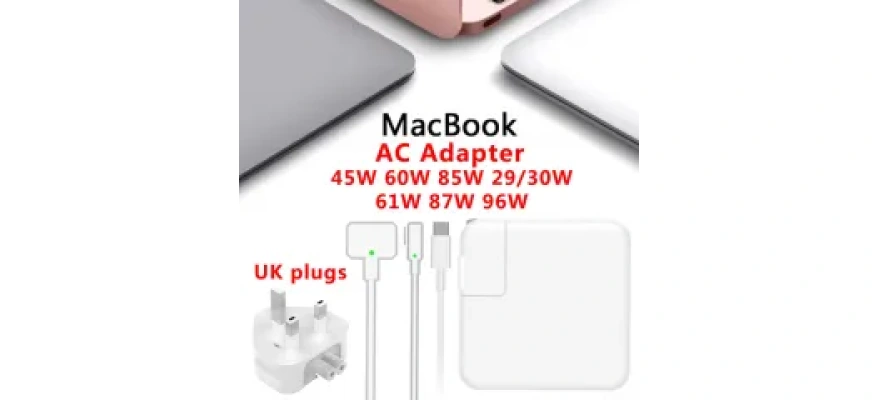
Buy Apple MacBook Air and MacBook Pro Chargers at Luztech Computer Solutions
Are you looking for a replacement Apple MacBook charger in Nairobi CBD, Kenya? Luztech Computer Solutions handles enquiries for MacBook Air and MacBook Pro chargers, including MagSafe 1, MagSafe 2, USB-C and MagSafe 3 power adapters.
Whether you own an older Intel MacBook, a MacBook Air, a MacBook Pro Retina, an M1, M2, M3, M4 or the 2025 M5 MacBook Pro, identifying the correct charger is essential.
Apple has introduced different charging connectors, power adapters and wattage requirements across its MacBook generations. Even when two laptops look similar, they may use different charging connectors or require different power ratings.
At Luztech Computer Solutions, we help customers identify compatible MacBook chargers using:
- Apple model number (A-number)
- MacBook model and screen size
- Year of introduction
- Intel processor or Apple Silicon chip
- Charging connector
- Required charger wattage
- Original adapter specifications
This guide provides a detailed reference for identifying MacBook chargers from older MagSafe models to the latest 2025 M5 MacBook Pro.
MacBook chargers available on enquiry:
- MagSafe 1 chargers – 45W, 60W and 85W
- MagSafe 2 chargers – 45W, 60W and 85W
- USB-C chargers – 29W, 30W, 61W, 67W, 87W and 96W
- MagSafe 3 charging solutions – 67W, 70W, 96W and 140W
- USB-C charging cables
- USB-C to MagSafe 3 cables
- Compatible power cords and adapters
Availability and compatibility are confirmed against the exact MacBook model.
1. Understanding Apple MacBook Charger Types
Apple has used four main MacBook charging connector families.
1.1 MagSafe 1 Charger
MagSafe 1 was introduced in 2006. It uses a magnetic connector that attaches to a dedicated charging port on the MacBook.
It was used on older MacBook, MacBook Air and MacBook Pro models.
Common wattages:
- 45W MagSafe 1 – MacBook Air
- 60W MagSafe 1 – selected MacBook and 13-inch MacBook Pro
- 85W MagSafe 1 – selected 15-inch and 17-inch MacBook Pro
1.2 MagSafe 2 Charger
MagSafe 2 was introduced in 2012. It has a thinner and wider magnetic connector than MagSafe 1.
It was used on selected MacBook Air and MacBook Pro Retina models.
Common wattages:
- 45W MagSafe 2 – MacBook Air
- 60W MagSafe 2 – 13-inch MacBook Pro Retina
- 85W MagSafe 2 – 15-inch MacBook Pro Retina
1.3 USB-C MacBook Charger
Apple introduced USB-C charging with the 12-inch MacBook in 2015 and later introduced it across MacBook Air and MacBook Pro models.
USB-C charging uses a reversible connector and USB Power Delivery technology.
Common power adapter ratings:
- 29W
- 30W
- 61W
- 67W
- 70W
- 87W
- 96W
1.4 MagSafe 3 MacBook Charger
MagSafe 3 was reintroduced with the redesigned MacBook Pro in 2021 and MacBook Air in 2022.
It uses a magnetic charging cable connected to a separate USB-C power adapter.
Common power adapter ratings:
- 67W
- 70W
- 96W
- 140W
Important: MagSafe 3 is not the same connector as MagSafe 1 or MagSafe 2. A MagSafe 3 MacBook can also support charging through a compatible USB-C port.
2. MacBook MagSafe 1 Chargers – A-Numbers, Models and Years
MagSafe 1 was used on older MacBook models manufactured between 2006 and 2012.
The following table covers the main MacBook families and their commonly used A-numbers.
2.1 MacBook MagSafe 1 Models
| MacBook model | Year introduced | A-number | Charger | Wattage |
|---|---|---|---|---|
| MacBook 13-inch | 2006 | A1181 | MagSafe 1 | 60W |
| MacBook 13-inch | 2007 | A1181 | MagSafe 1 | 60W |
| MacBook 13-inch | 2008 | A1181 | MagSafe 1 | 60W |
| MacBook 13-inch Aluminium | 2008 | A1278 | MagSafe 1 | 60W |
| MacBook 13-inch White Unibody | 2009 | A1342 | MagSafe 1 | 60W |
| MacBook 13-inch White Unibody | 2010 | A1342 | MagSafe 1 | 60W |
2.2 MacBook Air MagSafe 1 Models
| MacBook model | Year | A-number | Charger | Wattage |
|---|---|---|---|---|
| MacBook Air 13-inch | 2008 | A1237 | MagSafe 1 | 45W |
| MacBook Air 13-inch | 2009 | A1304 | MagSafe 1 | 45W |
| MacBook Air 13-inch | 2010 | A1369 | MagSafe 1 | 45W |
| MacBook Air 11-inch | 2010 | A1370 | MagSafe 1 | 45W |
| MacBook Air 13-inch | 2011 | A1369 | MagSafe 1 | 45W |
| MacBook Air 11-inch | 2011 | A1370 | MagSafe 1 | 45W |
2.3 MacBook Pro MagSafe 1 Models
| MacBook model | Year | A-number | Charger | Wattage |
|---|---|---|---|---|
| MacBook Pro 15-inch | 2006–2008 | A1150 / A1260 / A1261 | MagSafe 1 | 85W |
| MacBook Pro 17-inch | 2006–2008 | A1151 / A1229 / A1261 | MagSafe 1 | 85W |
| MacBook Pro 15-inch Unibody | 2008–2009 | A1286 | MagSafe 1 | 85W |
| MacBook Pro 13-inch Unibody | 2009–2012 | A1278 | MagSafe 1 | 60W |
| MacBook Pro 15-inch Unibody | 2009–2012 | A1286 | MagSafe 1 | 85W |
| MacBook Pro 17-inch Unibody | 2009–2011 | A1297 | MagSafe 1 | 85W |
Note: Some A-numbers cover several model years and hardware configurations. Check the exact MacBook year and original adapter rating before supplying a charger.
3. MacBook MagSafe 2 Chargers – A-Numbers, Models and Years
MagSafe 2 was introduced in 2012 and used on MacBook Air and MacBook Pro Retina models.
The connector is physically different from MagSafe 1.
3.1 MacBook Air MagSafe 2 Models
| MacBook model | Year | A-number | Charger | Wattage |
|---|---|---|---|---|
| MacBook Air 11-inch | Mid 2012 | A1465 | MagSafe 2 | 45W |
| MacBook Air 13-inch | Mid 2012 | A1466 | MagSafe 2 | 45W |
| MacBook Air 11-inch | Mid 2013 | A1465 | MagSafe 2 | 45W |
| MacBook Air 13-inch | Mid 2013 | A1466 | MagSafe 2 | 45W |
| MacBook Air 11-inch | Early 2014 | A1465 | MagSafe 2 | 45W |
| MacBook Air 13-inch | Early 2014 | A1466 | MagSafe 2 | 45W |
| MacBook Air 11-inch | Early 2015 | A1465 | MagSafe 2 | 45W |
| MacBook Air 13-inch | Early 2015 | A1466 | MagSafe 2 | 45W |
| MacBook Air 13-inch | 2017 | A1466 | MagSafe 2 | 45W |
3.2 MacBook Pro MagSafe 2 Models
| MacBook model | Year | A-number | Charger | Wattage |
|---|---|---|---|---|
| MacBook Pro Retina 15-inch | Mid 2012 | A1398 | MagSafe 2 | 85W |
| MacBook Pro Retina 13-inch | Late 2012 | A1425 | MagSafe 2 | 60W |
| MacBook Pro Retina 15-inch | Early 2013 | A1398 | MagSafe 2 | 85W |
| MacBook Pro Retina 13-inch | Early 2013 | A1425 | MagSafe 2 | 60W |
| MacBook Pro Retina 15-inch | Late 2013 | A1398 | MagSafe 2 | 85W |
| MacBook Pro Retina 13-inch | Late 2013 | A1502 | MagSafe 2 | 60W |
| MacBook Pro Retina 15-inch | Mid 2014 | A1398 | MagSafe 2 | 85W |
| MacBook Pro Retina 13-inch | Mid 2014 | A1502 | MagSafe 2 | 60W |
| MacBook Pro Retina 13-inch | Early 2015 | A1502 | MagSafe 2 | 60W |
| MacBook Pro Retina 15-inch | Mid 2015 | A1398 | MagSafe 2 | 85W |
Important A1502 and A1398 Identification
Customers frequently ask for chargers for the following MacBook models:
- MacBook Pro A1502 – 13-inch Retina – MagSafe 2 – 60W
- MacBook Pro A1398 – 15-inch Retina – MagSafe 2 – 85W
- MacBook Air A1466 – 13-inch – MagSafe 2 – 45W
- MacBook Air A1465 – 11-inch – MagSafe 2 – 45W
These are common MagSafe 2 charger enquiries.
4. MacBook USB-C Chargers – A-Numbers, Models and Years
Apple introduced USB-C charging with the 12-inch MacBook in 2015.
The USB-C charging system was later adopted by MacBook Air and MacBook Pro models.
4.1 MacBook 12-inch USB-C Models
| MacBook model | Year | A-number | Charger | Wattage |
|---|---|---|---|---|
| MacBook Retina 12-inch | Early 2015 | A1534 | USB-C | 29W |
| MacBook Retina 12-inch | Early 2016 | A1534 | USB-C | 29W |
| MacBook Retina 12-inch | 2017 | A1534 | USB-C | 29W |
4.2 MacBook Air USB-C Models
| MacBook model | Year | A-number | Charger | Wattage |
|---|---|---|---|---|
| MacBook Air Retina 13-inch | 2018 | A1932 | USB-C | 30W |
| MacBook Air Retina 13-inch | 2019 | A1932 | USB-C | 30W |
| MacBook Air Retina 13-inch | 2020 Intel | A2179 | USB-C | 30W |
| MacBook Air 13-inch M1 | 2020 | A2337 | USB-C | 30W |
4.3 MacBook Pro 13-inch USB-C Models
| MacBook model | Year | A-number | Charger | Wattage |
|---|---|---|---|---|
| MacBook Pro 13-inch | 2016 | A1708 / A1706 | USB-C | 61W |
| MacBook Pro 13-inch | 2017 | A1708 / A1706 | USB-C | 61W |
| MacBook Pro 13-inch | 2018 | A1989 | USB-C | 61W |
| MacBook Pro 13-inch | 2019 | A1989 | USB-C | 61W |
| MacBook Pro 13-inch | 2019 | A2159 | USB-C | 61W |
| MacBook Pro 13-inch | 2020 Intel | A2289 | USB-C | 61W |
| MacBook Pro 13-inch | 2020 Intel | A2251 | USB-C | 61W |
| MacBook Pro 13-inch M1 | 2020 | A2338 | USB-C | 61W |
| MacBook Pro 13-inch M2 | 2022 | A2338 | USB-C | 61W |
4.4 MacBook Pro 15-inch USB-C Models
| MacBook model | Year | A-number | Charger | Wattage |
|---|---|---|---|---|
| MacBook Pro 15-inch | 2016 | A1707 | USB-C | 87W |
| MacBook Pro 15-inch | 2017 | A1707 | USB-C | 87W |
| MacBook Pro 15-inch | 2018 | A1990 | USB-C | 87W |
| MacBook Pro 15-inch | 2019 | A1990 | USB-C | 87W |
4.5 MacBook Pro 16-inch USB-C Models
| MacBook model | Year | A-number | Charger | Wattage |
|---|---|---|---|---|
| MacBook Pro 16-inch Intel | 2019 | A2141 | USB-C | 96W |
| MacBook Pro 16-inch Intel | 2020 | A2141 | USB-C | 96W |
These 16-inch Intel MacBook Pro models use USB-C charging rather than MagSafe 3.
5. MacBook MagSafe 3 Chargers – A-Numbers, Models and Years
Apple reintroduced MagSafe charging with the 2021 MacBook Pro models.
MagSafe 3 uses a USB-C power adapter and a separate USB-C-to-MagSafe 3 charging cable.
5.1 MacBook Pro 14-inch MagSafe 3 Models
| MacBook model | Year | A-number | Charger | Wattage |
|---|---|---|---|---|
| MacBook Pro 14-inch M1 Pro / M1 Max | 2021 | A2442 | MagSafe 3 | 67W / 96W |
| MacBook Pro 14-inch M2 Pro / M2 Max | 2023 | A2779 | MagSafe 3 | 67W / 96W |
| MacBook Pro 14-inch M3 | 2023 | A2918 | MagSafe 3 | 70W |
| MacBook Pro 14-inch M3 Pro / M3 Max | 2023 | A2992 | MagSafe 3 | 96W |
| MacBook Pro 14-inch M4 | 2024 | A3112 | MagSafe 3 | 70W |
| MacBook Pro 14-inch M4 Pro / M4 Max | 2024 | A3401 / A3185 | MagSafe 3 | 96W |
| MacBook Pro 14-inch M5 | 2025 | Confirm exact A-number on unit | MagSafe 3 | Confirm original adapter |
5.2 MacBook Pro 16-inch MagSafe 3 Models
| MacBook model | Year | A-number | Charger | Wattage |
|---|---|---|---|---|
| MacBook Pro 16-inch M1 Pro / M1 Max | 2021 | A2485 | MagSafe 3 | 140W |
| MacBook Pro 16-inch M2 Pro / M2 Max | 2023 | A2780 | MagSafe 3 | 140W |
| MacBook Pro 16-inch M3 Pro / M3 Max | 2023 | A2991 | MagSafe 3 | 140W |
| MacBook Pro 16-inch M4 Pro / M4 Max | 2024 | A3403 | MagSafe 3 | 140W |
5.3 MacBook Air MagSafe 3 Models
| MacBook model | Year | A-number | Charging system | Common adapter |
|---|---|---|---|---|
| MacBook Air 13-inch M2 | 2022 | A2681 | MagSafe 3 / USB-C | 30W / 35W options |
| MacBook Air 15-inch M2 | 2023 | A2941 | MagSafe 3 / USB-C | 35W / 70W options |
| MacBook Air 13-inch M3 | 2024 | A3113 | MagSafe 3 / USB-C | 30W / 35W options |
| MacBook Air 15-inch M3 | 2024 | A3114 | MagSafe 3 / USB-C | 35W / 70W options |
| MacBook Air 13-inch M4 | 2025 | A3240 | MagSafe 3 / USB-C | 30W / 35W options |
| MacBook Air 15-inch M4 | 2025 | A3241 | MagSafe 3 / USB-C | 35W / 70W options |
The listed power ratings are common adapter options, not a guarantee that every original retail package contained the same adapter.
6. MacBook M1, M2, M3, M4 and M5 Chargers – Quick Reference
This section is particularly useful for customers who identify their laptops by processor generation.
| MacBook model | Year | A-number | Charging connector | Common wattage |
|---|---|---|---|---|
| MacBook Air M1 13-inch | 2020 | A2337 | USB-C | 30W |
| MacBook Pro M1 13-inch | 2020 | A2338 | USB-C | 61W |
| MacBook Pro M1 Pro 14-inch | 2021 | A2442 | MagSafe 3 | 67W / 96W |
| MacBook Pro M1 Max 16-inch | 2021 | A2485 | MagSafe 3 | 140W |
| MacBook Air M2 13-inch | 2022 | A2681 | MagSafe 3 / USB-C | 30W / 35W |
| MacBook Pro M2 13-inch | 2022 | A2338 | USB-C | 61W |
| MacBook Pro M2 Pro 14-inch | 2023 | A2779 | MagSafe 3 | 67W / 96W |
| MacBook Pro M2 Max 16-inch | 2023 | A2780 | MagSafe 3 | 140W |
| MacBook Air M2 15-inch | 2023 | A2941 | MagSafe 3 / USB-C | 35W / 70W |
| MacBook Pro M3 14-inch | 2023 | A2918 | MagSafe 3 | 70W |
| MacBook Pro M3 Pro / Max 14-inch | 2023 | A2992 | MagSafe 3 | 96W |
| MacBook Pro M3 Pro / Max 16-inch | 2023 | A2991 | MagSafe 3 | 140W |
| MacBook Air M3 13-inch | 2024 | A3113 | MagSafe 3 / USB-C | 30W / 35W |
| MacBook Air M3 15-inch | 2024 | A3114 | MagSafe 3 / USB-C | 35W / 70W |
| MacBook Pro M4 14-inch | 2024 | A3112 | MagSafe 3 | 70W |
| MacBook Pro M4 Pro / Max 14-inch | 2024 | A3401 / A3185 | MagSafe 3 | 96W |
| MacBook Pro M4 Pro / Max 16-inch | 2024 | A3403 | MagSafe 3 | 140W |
| MacBook Air M4 13-inch | 2025 | A3240 | MagSafe 3 / USB-C | 30W / 35W |
| MacBook Air M4 15-inch | 2025 | A3241 | MagSafe 3 / USB-C | 35W / 70W |
| MacBook Pro M5 14-inch | 2025 | Confirm exact A-number | MagSafe 3 | Confirm original adapter |
Important M5 distinction: The 2025 MacBook Pro M5 is a 14-inch model. Do not confuse it with later M5 Pro or M5 Max generations introduced in subsequent years.
7. MacBook Charger Wattage Guide
Different MacBook models require different charger ratings.
| Charger type | Wattage | Typical compatible MacBook family |
|---|---|---|
| MagSafe 1 | 45W | Older MacBook Air |
| MagSafe 1 | 60W | Older MacBook and 13-inch Pro |
| MagSafe 1 | 85W | Older 15-inch and 17-inch Pro |
| MagSafe 2 | 45W | MacBook Air A1465 / A1466 |
| MagSafe 2 | 60W | MacBook Pro Retina A1425 / A1502 |
| MagSafe 2 | 85W | MacBook Pro Retina A1398 |
| USB-C | 29W | MacBook 12-inch A1534 |
| USB-C | 30W | MacBook Air |
| USB-C | 61W | MacBook Pro 13-inch |
| USB-C | 67W | Selected 14-inch MacBook Pro |
| USB-C | 70W | Selected MacBook Air and 14-inch MacBook Pro |
| USB-C | 87W | MacBook Pro 15-inch |
| USB-C | 96W | Selected 16-inch Intel and 14-inch Apple Silicon Pro |
| USB-C | 140W | MacBook Pro 16-inch Apple Silicon |
For MagSafe 3, the wattage refers to the USB-C power adapter used with the separate MagSafe 3 cable.
8. Common MacBook Charger Problems
A faulty MacBook charger can affect the laptop’s charging performance or prevent it from powering on.
Common problems include:
- MacBook charger not working
- MacBook not charging
- MagSafe indicator light not coming on
- USB-C charger not detected
- Charging cable damaged
- MagSafe connector damaged
- Charger overheating
- Intermittent charging
- MacBook battery not increasing in percentage
- Charger making unusual noises
- Power adapter damaged after an electrical surge
A charging problem is not always caused by the charger. The battery, charging port, USB-C board, DC-in connection or motherboard may also be responsible.
If the adapter or cable is visibly damaged or unusually hot, stop using it and have it inspected.
9. How to Identify Your MacBook A-Number and Correct Charger
The A-number is an important reference when sourcing MacBook chargers and spare parts.
Method 1: Check the bottom of your MacBook
Turn the MacBook over and look for the small regulatory text printed on the underside.
You may see a model number such as:
- A1502
- A1398
- A1466
- A1708
- A1932
- A2179
- A2337
- A2338
- A2442
- A2485
- A2681
- A2779
- A3112
- A3240
2: Check About This Mac
- Turn on your MacBook.
- Click the Apple menu.
- Select About This Mac.
- Check the MacBook name and processor.
- Note the year and chip generation.
3: Check System Information
- Hold the Option key.
- Click the Apple menu.
- Select System Information.
- Select Hardware.
- Check the Model Identifier and other system details.
4: the original charger
The original power adapter usually has its wattage and electrical specifications printed on its label.
Use these details together with the MacBook model to identify the replacement.
When ordering from Luztech Computer Solutions, provide the A-number, MacBook year and a photograph of the original charger or charging port where possible.
10. Why Choose Luztech Computer Solutions for MacBook Chargers in Nairobi?
Luztech Computer Solutions handles enquiries for MacBook Air and MacBook Pro chargers across older Intel and newer Apple Silicon generations.
Our MacBook charger services include:
- MacBook Air charger replacement
- MacBook Pro charger replacement
- MagSafe 1 charger replacement
- MagSafe 2 charger replacement
- USB-C charger replacement
- MagSafe 3 power adapter replacement
- USB-C charging cable replacement
- USB-C to MagSafe 3 cable replacement
- MacBook charging port diagnostics
- MacBook battery and charging-system troubleshooting
What we help customers verify
- MacBook A-number
- Laptop model and year
- Correct charging connector
- Required voltage and wattage
- Compatible USB Power Delivery adapter
- Charging cable type
- Power cord inclusion
- Product warranty
We aim to help customers avoid purchasing incompatible chargers based only on appearance or a general MacBook series name.
11. MacBook Chargers Available at Luztech Computer Solutions
Customers can enquire about the following charger categories:
MagSafe 1 Chargers
- 45W MagSafe 1
- 60W MagSafe 1
- 85W MagSafe 1
MagSafe 2 Chargers
- 45W MagSafe 2
- 60W MagSafe 2
- 85W MagSafe 2
USB-C MacBook Chargers
- 29W USB-C
- 30W USB-C
- 61W USB-C
- 67W USB-C
- 70W USB-C
- 87W USB-C
- 96W USB-C
MagSafe 3 Charging Solutions
- 67W USB-C power adapter
- 70W USB-C power adapter
- 96W USB-C power adapter
- 140W USB-C power adapter
- USB-C to MagSafe 3 charging cables
Product availability, warranty and package contents should be confirmed before purchase.
12. Contact Luztech Computer Solutions for MacBook Chargers in Nairobi CBD
Are you looking for a replacement charger for your MacBook Air or MacBook Pro?
Whether you need a 45W MagSafe 2 charger for an A1466 MacBook Air, a 60W MagSafe 2 charger for an A1502 MacBook Pro, a 61W USB-C adapter for an M1 MacBook Pro or a MagSafe 3 charging solution for a newer MacBook, Luztech Computer Solutions can assist with identifying a compatible option.
Luztech Computer Solutions
- Phone / WhatsApp: 0702 981 367
- Address: Rehimtulla Trust Building, 2nd Floor, Shop 27B, Moi Avenue, Nairobi CBD, opposite Bihi Tower.
When making an enquiry, provide:
- Your MacBook A-number.
- The MacBook model and year.
- The processor or Apple Silicon chip.
- The charger wattage, if known.
- A photograph of the charging port or original adapter.
Luztech Computer Solutions – MacBook USB-C and MagSafe Chargers, Laptop Repairs and Computer Accessories in Nairobi CBD, Kenya.
Frequently Asked Questions About MacBook USB-C and MagSafe Chargers
1. Where can I buy a MacBook charger in Nairobi CBD?
Contact Luztech Computer Solutions for enquiries about MacBook Air and MacBook Pro chargers, including MagSafe 1, MagSafe 2, USB-C and MagSafe 3.
2. What charger does MacBook Pro A1502 use?
The MacBook Pro Retina 13-inch A1502 uses a 60W MagSafe 2 charger.
3. What charger does MacBook Pro A1398 use?
The 15-inch Retina MacBook Pro A1398 uses an 85W MagSafe 2 charger.
4. What charger does MacBook Air A1466 use?
MacBook Air A1466 uses a 45W MagSafe 2 charger.
5. What charger does MacBook Air M1 A2337 use?
The MacBook Air M1 13-inch A2337 commonly uses a 30W USB-C power adapter.
6. What charger does MacBook Pro M1 A2338 use?
The 13-inch MacBook Pro M1 A2338 commonly uses a 61W USB-C power adapter.
7. What charger does MacBook Pro M2 A2338 use?
The 13-inch MacBook Pro M2 A2338 also uses a 61W USB-C power adapter.
8. What charger does MacBook Pro A2442 use?
The 14-inch MacBook Pro A2442 introduced in 2021 supports MagSafe 3 charging and was supplied with a 67W or 96W adapter depending on configuration.
9. What charger does MacBook Pro A2485 use?
The 16-inch MacBook Pro A2485 uses a 140W USB-C power adapter with a USB-C-to-MagSafe 3 cable.
10. What charger does MacBook Air A2681 use?
The 13-inch MacBook Air M2 A2681 supports MagSafe 3 and USB-C charging. Common adapter options include 30W and 35W, with higher-wattage compatible adapters also supported.
11. What charger does MacBook Pro A2779 use?
The 14-inch MacBook Pro M2 Pro or M2 Max A2779 uses MagSafe 3. The recommended adapter depends on its configuration.
12. What charger does MacBook Pro A2918 use?
The 14-inch MacBook Pro M3 A2918 commonly uses a 70W USB-C adapter with a MagSafe 3 cable.
13. What charger does MacBook Pro A2991 use?
The 16-inch MacBook Pro M3 Pro or M3 Max A2991 uses a 140W USB-C power adapter with MagSafe 3.
14. What charger does MacBook Air A3240 use?
The 13-inch MacBook Air M4 introduced in 2025 supports MagSafe 3 and USB-C charging. Adapter options depend on the configuration.
15. What charger does the 2025 MacBook Pro M5 use?
The 14-inch MacBook Pro M5 introduced in 2025 uses MagSafe 3 and can also charge through compatible USB-C ports. Confirm the exact adapter specification before purchase.
16. Can I use a higher-wattage USB-C charger on my MacBook?
A compatible USB-C Power Delivery adapter with a higher wattage can generally be used. The MacBook manages the power it draws. Use an adapter that meets the model’s recommended requirements.
17. Are MagSafe 1 and MagSafe 2 chargers interchangeable?
They have different connector designs. A compatible MagSafe-to-MagSafe 2 converter can allow certain older adapters to work with MagSafe 2 models, but compatibility and wattage must be checked.
18. Are MagSafe 2 and MagSafe 3 chargers interchangeable?
No. They use different connectors. MagSafe 2 chargers cannot directly connect to MagSafe 3 MacBooks.
19. Can I charge a MagSafe 3 MacBook using USB-C?
Yes. Compatible MagSafe 3 MacBook models can also charge through their USB-C ports using a suitable USB-C Power Delivery adapter and cable.
20. How do I identify the correct MacBook charger?
Check the A-number, model year, charging connector and original charger wattage. You can also send these details to Luztech Computer Solutions for assistance.
