
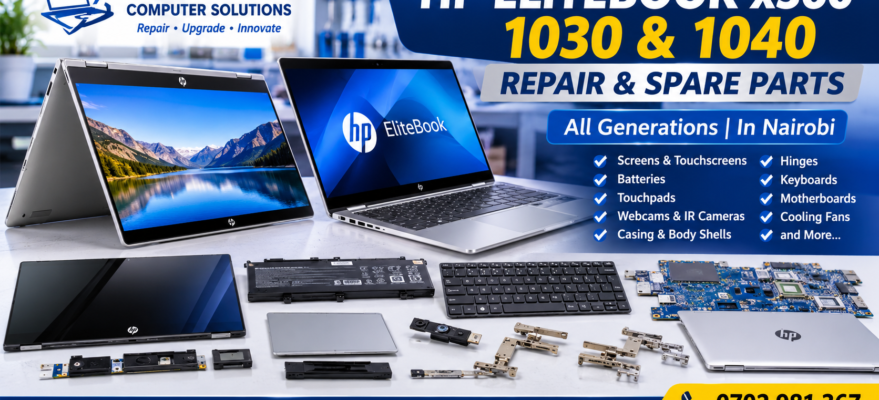
Professional HP EliteBook x360 1030 and 1040 Repair Services at Luztech Computer Solutions
Are you looking for reliable HP EliteBook x360 1030 or 1040 repair and spare parts replacement in Nairobi, Kenya? Luztech Computer Solutions provides laptop diagnostics, repair services and replacement parts for supported HP EliteBook x360 1030 and 1040 models.
The HP EliteBook x360 is a premium convertible business laptop designed for productivity, portability and touchscreen use. Its 360-degree hinge allows it to operate as a traditional laptop, tablet, tent or presentation device. However, like other laptops, its screen, battery, keyboard, touchpad, hinges, casing, webcam, motherboard and other internal components can become damaged or faulty.
At Luztech Computer Solutions, we handle repair enquiries and source replacement components for different generations of the HP EliteBook x360 1030 and 1040 series. Whether your laptop has a cracked touchscreen, weak battery, faulty keyboard, damaged casing, broken hinge, charging problem or motherboard fault, our technicians can assess the problem and advise on the appropriate repair.
We cover older models as well as later generations, subject to model and component availability.
1. HP EliteBook x360 1030 and 1040 Models We Cover
Our repair and spare-parts service covers the following model families:
HP EliteBook x360 1030 Series
- HP EliteBook x360 1030 G2
- HP EliteBook x360 1030 G3
- HP EliteBook x360 1030 G4
- HP EliteBook x360 1030 G7
- HP EliteBook x360 1030 G8
HP EliteBook x360 1040 Series
- HP EliteBook x360 1040 G5
- HP EliteBook x360 1040 G6
- HP EliteBook x360 1040 G7
- HP EliteBook x360 1040 G8
- HP Elite x360 1040 G9
- HP Elite x360 1040 G10
- HP Elite x360 1040 G11
Important model identification note: HP’s product naming changed on some later generations. For example, later 1040 models may be identified as HP Elite x360 1040 rather than HP EliteBook x360 1040. Always confirm the exact model name, product number and component part number before ordering a replacement.
The model list above identifies the generations covered by our repair and parts enquiries. It does not mean that every component is interchangeable or that every part is permanently in stock.
2. HP EliteBook x360 Screen and Touchscreen Replacement
The touchscreen is one of the most important components of an HP EliteBook x360. Because these laptops are convertible devices, their display assemblies are designed for touchscreen operation and regular movement between laptop and tablet positions.
We assist with screen and touchscreen replacement for supported HP EliteBook x360 1030 and 1040 models.
Common HP EliteBook x360 screen problems
- Cracked or physically damaged touchscreen
- Broken display glass
- Touchscreen not responding
- Display showing vertical or horizontal lines
- Flickering or intermittent display
- Black screen or blank display
- Dim screen or uneven brightness
- Dead pixels or display spots
- Discoloured display
- Damaged screen connector or display cable
- Screen damage following a fall or pressure
Screen and display parts available on request
- LCD display panels
- Touchscreen display assemblies
- Screen glass and digitizer assemblies, where separately serviceable
- Complete display assemblies
- Screen back covers
- Display bezels
- Display hinges
- LCD display cables
- Touchscreen cables and connectors
Screen compatibility: HP EliteBook x360 1030 and 1040 screens are not all the same. Screen size, resolution, brightness, touch technology, connector, cable arrangement, mounting points and display assembly design can vary by generation and configuration.
We therefore recommend confirming the exact laptop product number before purchasing a replacement screen. In some models, replacing the complete touchscreen assembly may be more appropriate than replacing an individual display component.
3. HP EliteBook x360 Battery Replacement
A faulty battery can affect the portability and everyday performance of your HP EliteBook x360. If your laptop switches off unexpectedly, loses charge quickly or only works when connected to a charger, the battery may require testing or replacement.
Luztech Computer Solutions handles battery replacement enquiries for supported HP EliteBook x360 1030 and 1040 generations.
Common battery problems
- Battery drains unusually fast
- Laptop does not charge
- Battery percentage remains unchanged
- Laptop switches off when disconnected from the charger
- Battery is not detected
- Battery health has deteriorated
- Laptop reports a battery error
- Battery is swollen or physically damaged
Battery replacement service
We can assist with:
- HP EliteBook x360 1030 replacement batteries
- HP EliteBook x360 1040 replacement batteries
- Battery diagnostics and health checks
- Battery connector inspection
- Charging-system diagnosis
- Battery installation and testing
Battery specifications and part numbers differ across generations. We verify the battery model, voltage, capacity, connector and physical design before recommending a replacement.
Battery safety: If the laptop casing or touchpad begins lifting, the bottom cover becomes distorted, or the battery appears swollen, stop using and charging the laptop. A swollen lithium-ion battery should be handled by a qualified technician.
4. HP EliteBook x360 Touchpad and Clickpad Replacement
The touchpad allows users to control the cursor, scroll, select items and perform multi-touch gestures without an external mouse.
A damaged touchpad can make an otherwise functional laptop difficult to use.
Common touchpad problems
- Touchpad not responding
- Cursor moving erratically
- Touchpad buttons not working
- Clicking function not working
- Delayed cursor response
- Touchpad gestures not working
- Physical damage to the touchpad surface
- Loose or damaged touchpad connector
Touchpad parts and repairs
We handle enquiries for:
- HP EliteBook x360 1030 touchpads
- HP EliteBook x360 1040 touchpads
- Clickpad assemblies
- Touchpad buttons, where separately replaceable
- Touchpad cables and connectors
- Palm-rest assemblies where the touchpad is integrated
Some generations have touchpad components integrated into larger assemblies. We check the exact design before recommending an individual part or complete palm-rest replacement.
5. HP EliteBook x360 Keyboard Replacement
A faulty keyboard can affect typing, office work, communication and general laptop use.
We provide keyboard repair and replacement services for supported HP EliteBook x360 1030 and 1040 models.
Common keyboard problems
- Some keys are not working
- Keyboard types incorrect characters
- Missing or broken keys
- Keyboard affected by liquid spills
- Keyboard backlight not working
- Keyboard not detected
- Keyboard connector or cable damaged
- Keyboard has become physically worn
Keyboard parts and services
- HP EliteBook x360 1030 replacement keyboards
- HP EliteBook x360 1040 replacement keyboards
- Keyboard backlight assemblies
- Keyboard cables and connectors
- Keyboard-related motherboard diagnostics
- Keyboard and palm-rest assembly replacement where required
Keyboard layouts, backlighting, mounting methods and assembly designs differ between models. We confirm the correct keyboard before installation.
6. HP EliteBook x360 Webcam and Camera Replacement
The webcam is important for video conferencing, online meetings, remote learning and business communication.
A faulty camera can prevent you from using applications such as Microsoft Teams, Zoom and other video-conferencing platforms.
Common webcam problems
- Camera not detected
- Black screen when opening the camera
- Blurry or poor-quality image
- Camera disconnecting intermittently
- Webcam damaged after screen or hinge impact
- Camera cable damaged
- Infrared camera or facial-recognition function not working
Webcam and camera components
Depending on the laptop configuration, we can assist with:
- Front-facing webcam modules
- HD camera modules
- Infrared camera modules
- Camera cables
- Camera connectors
- Microphone modules
- Display-bezel camera assemblies
Not every HP EliteBook x360 configuration has the same webcam or infrared camera specification. We check the original configuration before replacing the camera.
7. HP EliteBook x360 Casing, Housing and Body Shell Replacement
The casing protects the laptop’s internal components and supports the screen, keyboard, touchpad, hinges and motherboard.
Damage to the casing can affect the laptop’s appearance, structural strength and ability to open and close properly.
Luztech Computer Solutions handles casing and housing replacement enquiries for supported HP EliteBook x360 1030 and 1040 models.
Casing parts we can help source
- LCD back cover
- Screen rear housing
- Display bezel
- Palm-rest assembly
- Keyboard frame
- Touchpad housing
- Bottom base cover
- D-cover or bottom casing
- Complete laptop body shell
- Internal casing brackets
- Mounting brackets and screws
Common casing problems
- Cracked screen back cover
- Broken plastic or metal mounting points
- Damaged bottom cover
- Palm-rest damage
- Loose or broken hinge mounting areas
- Bent or damaged casing
- Missing casing screws
- Casing separating around the display or keyboard
Because the HP EliteBook x360 is a convertible laptop, its casing and hinge mounting points must be in good condition. A damaged hinge mount should be inspected before fitting a replacement casing.
8. HP EliteBook x360 Hinge Repair and Replacement
The 360-degree hinge mechanism allows the laptop to fold into different operating positions. Damaged hinges can make opening and closing the laptop difficult and may eventually damage the screen assembly or casing.
Common hinge problems
- Laptop hinge is too tight
- Hinge is loose
- Screen does not stay in position
- Cracking sounds when opening or closing
- Display casing separating near the hinges
- Broken hinge mounting points
- Uneven movement between the two hinges
- Damaged hinge brackets or screws
Hinge repair and replacement
We assist with:
- Left and right hinge replacement
- Hinge bracket replacement
- Hinge mounting-point repairs
- Screen back-cover repairs
- Casing repairs around hinge areas
- Inspection of display cables affected by hinge movement
Important: Do not force a stiff or damaged hinge. Continued use can damage the display cable, touchscreen assembly, screen cover and motherboard connections.
9. HP EliteBook x360 Motherboard Repair and Replacement
The motherboard is the main circuit board responsible for communication between the processor, memory, storage, display, charging system, keyboard, touchpad and other components.
A motherboard fault can cause serious problems, including failure to power on or charge.
Common motherboard problems
- Laptop does not power on
- Power light comes on but there is no display
- Laptop switches off unexpectedly
- Charging circuit failure
- USB ports not working
- Keyboard or touchpad not detected
- Liquid damage
- Short circuit
- BIOS or firmware-related problems
- Overheating or unstable operation
Motherboard services
- Motherboard diagnostics
- Charging circuit inspection
- Power circuit troubleshooting
- BIOS and firmware-related diagnostics
- Component-level repair where feasible
- USB and other port diagnostics
- Motherboard replacement enquiries
Motherboards are model- and configuration-specific. Processor, memory, graphics, board revision, connectors and firmware requirements must be checked before sourcing a replacement.
10. HP EliteBook x360 Cooling Fan and Heatsink Replacement
The cooling system helps regulate internal temperatures and protect the processor and other components from excessive heat.
Dust accumulation, fan failure and damaged cooling components can cause overheating and poor performance.
Common cooling problems
- Cooling fan making unusual noise
- Laptop overheating
- Fan not spinning
- Laptop shutting down under load
- Excessive heat around the keyboard or base
- Poor performance caused by thermal throttling
- Damaged fan cable or connector
Cooling parts and services
- CPU cooling fans
- Cooling fan assemblies
- Heatsinks
- Thermal interface material replacement
- Internal cleaning
- Cooling-system inspection
- Fan connector and cable checks
Cooling fan and heatsink designs vary by model. We check the laptop’s exact configuration before recommending a replacement.
11. HP EliteBook x360 Speakers and Audio Parts
The audio system supports video calls, presentations, music playback and other everyday activities.
If the laptop has distorted sound or no sound, the problem may involve the speakers, audio cable, connector, driver or motherboard.
We handle enquiries for:
- Internal left and right speakers
- Speaker assemblies
- Speaker cables
- Audio connectors
- Microphone components
- Audio-related diagnostics
Where the speakers are working correctly, we can also help investigate software, driver and audio configuration problems.
12. HP EliteBook x360 Charging Port and Charger Replacement
Charging problems do not always mean the battery is faulty. The issue may come from the charger, charging port, DC-in connection, USB-C charging circuit or motherboard.
We provide diagnostic and replacement-part enquiries for supported HP EliteBook x360 models.
Common charging problems
- Laptop does not charge
- Charger is not detected
- Charging connection is intermittent
- Charging port is loose or damaged
- Battery does not increase in percentage
- Laptop displays a power-adapter warning
- Laptop only charges at certain cable positions
Charging components
- Compatible HP power adapters
- USB-C chargers, where supported
- Charging ports and connectors
- DC-in cables and assemblies, where fitted
- Charging circuit diagnostics
Charger compatibility: Always confirm the laptop’s required wattage, voltage, connector type and USB-C power-delivery requirements. A charger that physically fits is not automatically suitable for every HP EliteBook x360.
13. HP EliteBook x360 SSD and Storage Upgrade
A faulty or slow storage drive can affect boot time, application loading and overall laptop performance.
Depending on the model, storage upgrade or replacement may be possible.
SSD services
- SSD diagnostics
- Faulty SSD replacement
- Compatible NVMe SSD installation
- Supported SATA SSD replacement
- Storage capacity upgrades
- Operating system installation
- Data migration, where possible
- Windows installation and configuration
The supported SSD type, physical size and interface depend on the exact model and motherboard configuration. We check compatibility before installing a replacement drive.
Data recovery and migration depend on the condition of the existing drive. A failing or physically damaged drive may not allow complete data recovery.
14. Other HP EliteBook x360 Spare Parts
Apart from the major components listed above, we also handle enquiries for additional internal and external parts.
These may include:
- LCD and touchscreen display cables
- Internal power cables
- Camera cables
- Wi-Fi and Bluetooth cards
- Wireless antenna cables
- USB and audio port assemblies
- Internal connectors
- CMOS batteries, where fitted
- Screws and mounting brackets
- Fingerprint reader components, where fitted
- Docking and connectivity-related components
Availability and compatibility depend on the exact model and configuration.
15. HP EliteBook x360 Software Installation and Technical Support
Not every laptop problem requires a hardware replacement. Some faults are caused by software, operating system errors, corrupted drivers or firmware problems.
Luztech Computer Solutions also assists with software-related laptop services.
Our services include:
- Windows installation and reinstallation
- Windows troubleshooting
- Driver installation and updates
- BIOS and firmware-related support
- Operating system startup repair
- Laptop performance troubleshooting
- SSD installation and operating system setup
- Data backup and migration where possible
- General laptop diagnostics
We first identify whether the problem is hardware-related or software-related before recommending a repair.
16. Why Choose Luztech Computer Solutions for HP EliteBook x360 Repairs?
When repairing a premium convertible laptop, correct diagnosis and component compatibility are important.
At Luztech Computer Solutions, we focus on identifying the actual problem and recommending a suitable repair.
What we offer
HP EliteBook x360 repair experience
We handle repair enquiries for different HP EliteBook x360 generations and components.
Wide range of replacement parts
We assist with screens, batteries, keyboards, touchpads, webcams, casing, hinges, motherboards, fans, chargers and other components.
Model-specific compatibility checks
We use the exact model and product number to help identify suitable replacement parts.
Professional diagnostics
We assess the reported fault before recommending a repair or replacement.
Repair and installation services
Where the required component and service are available, we can arrange installation and testing.
Support for older and newer models
We accept enquiries for supported HP EliteBook x360 1030 and 1040 generations, including later HP Elite x360 1040 models.
17. How to Identify Your HP EliteBook x360 Model Before Ordering Parts
Before purchasing a replacement component, it is important to identify the exact laptop model.
Two laptops may both be labelled HP EliteBook x360 1040 but have different screens, batteries, keyboards, motherboards or internal connectors.
You can help us identify your laptop by providing:
- The complete model name, such as HP EliteBook x360 1030 G3 or HP EliteBook x360 1040 G7.
- The product number or product ID.
- A clear photograph of the laptop’s bottom label, where readable.
- A photograph of the faulty component, if available.
- The part number printed on the original component, where accessible.
- A description of the problem.
You can also check the model information in the BIOS or Windows System Information, depending on the laptop’s condition.
Please do not order a part based on the series name alone. Confirm the exact product number and part number first. This helps reduce compatibility mistakes and unnecessary replacement costs.
18. Contact Luztech Computer Solutions for HP EliteBook x360 Repair in Nairobi
Is your HP EliteBook x360 1030 or 1040 screen broken? Does the battery fail to hold charge? Are the keyboard, touchpad, webcam, casing or hinges damaged?
Contact Luztech Computer Solutions for assistance with diagnostics, repair and compatible replacement parts.
We welcome enquiries for older and newer supported HP EliteBook x360 1030 and 1040 models.
Luztech Computer Solutions
- Phone / WhatsApp: 0702 981 367
- Address: Rehimtulla Trust Building, 2nd Floor, Shop 27B, Moi Avenue, Nairobi CBD, opposite Bihi Tower.
Send us your laptop model, product number and the part you need. Where possible, include a photograph of the original component so we can help identify the correct replacement.
Luztech Computer Solutions – Your partner for laptop repairs, upgrades and replacement parts in Nairobi.
Frequently Asked Questions (FAQs)
1. Do you repair HP EliteBook x360 1030 and 1040 laptops?
Yes. We handle repair enquiries for supported HP EliteBook x360 1030 and 1040 generations, including screen, battery, keyboard, touchpad, casing, hinge, motherboard and other hardware problems.
2. Do you replace HP EliteBook x360 touchscreen displays?
Yes. We assist with touchscreen and display replacement for supported models. The correct screen or complete display assembly must be confirmed using the laptop’s exact model and product number.
3. Can you replace an HP EliteBook x360 battery?
Yes. We handle battery replacement enquiries and check the battery specifications and part number before recommending a compatible replacement.
4. Do you have HP EliteBook x360 1030 and 1040 keyboards?
We handle keyboard replacement enquiries for supported models. Keyboard layout, backlighting, connector and mounting design must be checked before ordering.
5. Can you repair broken HP EliteBook x360 hinges?
Yes. We inspect hinge problems and can assist with hinge replacement, mounting repairs and related casing damage, depending on the condition of the laptop.
6. Do you replace HP EliteBook x360 casing and body shells?
We handle enquiries for screen back covers, bezels, palm rests, bottom covers, complete body shells and related casing components. Exact model compatibility must be confirmed.
7. Can you repair an HP EliteBook x360 motherboard?
We provide motherboard diagnostics and assess whether component-level repair or motherboard replacement is appropriate.
8. Do you repair HP EliteBook x360 G2, G3 and G4?
Yes. We accept repair and spare-parts enquiries for supported HP EliteBook x360 1030 G2, G3 and G4 models.
9. Do you support HP EliteBook x360 1030 G7 and G8?
Yes. We handle repair and parts enquiries for these generations, subject to the availability and compatibility of the required components.
10. Do you support HP EliteBook x360 1040 G5 to G11?
We accept enquiries across the HP EliteBook x360 1040 G5–G8 and later HP Elite x360 1040 G9–G11 generations. The exact model and part number must be verified.
11. Are HP EliteBook x360 1030 and 1040 parts interchangeable?
No. Do not assume that parts are interchangeable. Screen assemblies, batteries, keyboards, touchpads, casing, hinges and motherboards can differ between models and generations.
12. What information should I provide when requesting an HP EliteBook x360 spare part?
Provide the full laptop model, product number, the name of the required component and, if possible, the original component’s part number or a clear photograph.
13. Can you install the replacement parts?
Installation can be arranged for compatible components and supported repair jobs. The laptop should be assessed to confirm the correct part and repair procedure.
14. Do you offer Windows installation and SSD upgrades for HP EliteBook x360 laptops?
Yes. We assist with supported SSD replacements and upgrades, Windows installation, driver setup and general software troubleshooting.
15. How can I contact Luztech Computer Solutions?
Call or WhatsApp 0702 981 367, or visit Luztech Computer Solutions at Rehimtulla Trust Building, 2nd Floor, Shop 27B, Moi Avenue, Nairobi CBD, opposite Bihi Tower.
