
Description
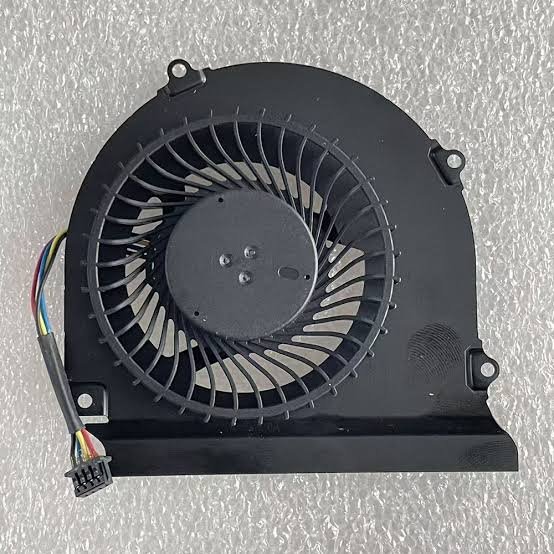
Looking for a Dell E6440 fan replacement in Kenya? Luztech helps you find compatible cooling fans and thermal-cooling components for the Dell Latitude E6440. If your laptop fan is noisy, faulty, not spinning or struggling to cool the processor, replacing the damaged component can help restore proper cooling and reliable performance.
Compatible Dell Latitude E6440 Cooling Fan
The Dell Latitude E6440 uses an internal cooling fan connected to its thermal-cooling assembly. The fan works with the heatsink to move heat away from the processor and maintain suitable operating temperatures.
However, the thermal-cooling assembly can differ depending on the laptop’s graphics configuration. Dell’s service documentation specifically notes that the shape and screw arrangement of the cooling assembly vary between integrated-graphics and dedicated-graphics configurations. Therefore, match the replacement fan or assembly to the original hardware. <Cite refs={[“turn462547search1″,”turn462547search0”]}/>
Signs You Need a Dell Latitude E6440 Fan Replacement
Consider replacing your cooling fan if your laptop experiences:
- Loud, grinding or unusual fan noise.
- Cooling fan not spinning.
- Excessive heat during normal operation.
- Unexpected shutdowns caused by overheating.
- Reduced performance when running demanding applications.
- Fan errors or inconsistent cooling performance.
However, these symptoms can also result from dust accumulation, blocked ventilation, dried thermal paste or other cooling-system problems. A proper diagnosis helps identify the actual fault.
Spare Parts for All Dell Latitude E6440 Specifications
Luztech caters for all Dell Latitude E6440 specifications and configurations, including different processor, RAM, storage and graphics options. We can help you find compatible cooling fans, heatsinks and other replacement components for your specific laptop variant.
Additionally, we help customers identify the correct cooling component by checking the original part number, connector, mounting arrangement and graphics configuration.
Important Cooling Fan Compatibility Checks
Before ordering, confirm the following:
- Original fan part number or identification label.
- Fan connector and cable arrangement.
- Mounting points and physical dimensions.
- Integrated or dedicated graphics configuration.
- Whether you need the fan alone or the complete thermal-cooling assembly.
The fan and heatsink assembly are related but are not necessarily supplied as one component. Therefore, confirm exactly what is included before purchasing.
Dell Latitude E6440 Cooling Fan Installation
Replacing the cooling component requires access to the laptop’s internal cooling system. Dell’s service instructions require disconnecting the fan cable and removing the screws securing the heatsink assembly to the system board.
During installation, the cooling assembly must be correctly seated and secured, and the fan cable must be reconnected.
Why Choose Luztech?
At Luztech, we help customers identify compatible laptop cooling fans and replacement components for their specific devices. Furthermore, we assist with checking the correct fan and heatsink configuration before purchase.
Contact Luztech today for a Dell E6440 fan replacement in Kenya. Share a photograph of your original fan or its part number so we can help identify the correct replacement for your laptop.


Reviews
There are no reviews yet.