

Description
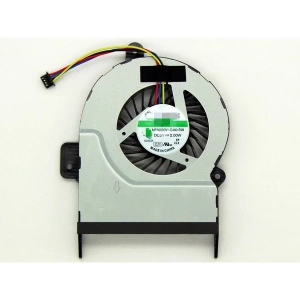
Keep your laptop running at a suitable operating temperature with a compatible Dell Latitude 5480 cooling fan from Luztech. The cooling fan helps circulate air through the laptop and dissipate heat generated by the processor and other internal components.
If your Dell Latitude 5480 fan is noisy, damaged, not spinning or failing to cool the laptop properly, replacing the faulty cooling component may help restore normal cooling performance.
Compatible Dell Latitude 5480 Cooling Fan
The Dell Latitude 5480 has different internal cooling configurations. Therefore, it is important to identify the correct replacement before ordering.
Depending on your laptop configuration, you may need:
- Standalone system fan: A replacement fan without the heatsink.
- Heatsink with fan assembly: A combined cooling component supplied with the heatsink.
Dell’s service documentation identifies separate replacement procedures for the system fan and heatsink-with-fan assembly. Additionally, its standalone system fan and heatsink procedures specify the UMA configuration. Therefore, confirm your laptop’s graphics configuration and original cooling assembly before purchasing.
Signs You Need a Dell Latitude 5480 Cooling Fan Replacement
Your laptop may need a replacement fan if you notice:
- Unusual grinding, rattling or buzzing noises
- The cooling fan does not spin
- Excessive heat around the keyboard or laptop base
- Frequent thermal shutdowns
- Reduced performance caused by overheating
- Fan error warnings during startup
However, overheating can also result from blocked air vents, dust accumulation, dried thermal paste or heatsink problems. Consequently, proper diagnosis helps determine whether you need a fan alone or the complete cooling assembly.
Fan Replacement or Complete Heatsink Assembly?
A standalone cooling fan and a heatsink-with-fan assembly are not necessarily interchangeable.
The standalone fan replaces the rotating fan component, while a complete assembly includes additional heat-dissipation components. Before ordering, compare the original fan’s part number, connector, mounting points and physical design.
You can also consult Dell’s official Latitude 5480 system fan replacement guide and fan assembly replacement video.
Why Choose Luztech?
- Assistance identifying compatible Dell cooling fans
- Guidance on matching fan part numbers and connectors
- Laptop spare parts and repair support
- Help determining whether you need a standalone fan or complete assembly
Explore our laptop spare parts or learn more about our laptop and computer repair services in Nairobi.
Order Your Dell Latitude 5480 Cooling Fan from Luztech
Looking for a replacement cooling fan in Kenya? Contact Luztech with your laptop’s configuration or a photograph of the original fan label. We can help identify the correct replacement and check compatibility before you order.


Reviews
There are no reviews yet.