
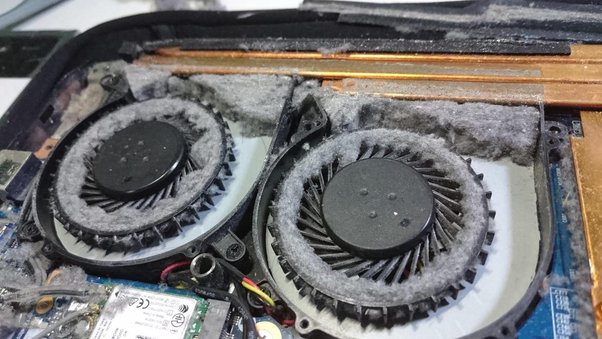
Luztech Computer Solutions provides professional laptop cooling system and overheating problem repair services in Nairobi for HP, Dell, Lenovo, Asus, Acer, Toshiba, Apple MacBook, Microsoft Surface, MSI, Samsung, Gigabyte, and many other laptop brands. We diagnose and repair overheating issues, cooling fan failures, blocked airflow systems, thermal paste problems, and temperature-related performance issues to restore stable and reliable laptop operation.
A properly functioning cooling system is essential for maintaining laptop performance. Modern laptops generate significant heat from the processor, graphics chip, memory, and storage devices. The cooling system is designed to dissipate this heat and maintain safe operating temperatures. When the cooling system fails, temperatures increase rapidly, affecting performance and potentially causing expensive hardware damage.
Understanding How a Laptop Cooling System Works
A laptop cooling system consists of several important components working together to remove heat from internal hardware.
The processor and graphics chip generate heat during operation. This heat is transferred to a heatsink through thermal paste. The heatsink absorbs and distributes heat, while cooling fans push hot air out through ventilation channels. Air vents allow cool air to enter and hot air to exit the laptop.
When any of these components fail or become obstructed, heat begins to accumulate inside the laptop.
Common cooling system components include:
- Cooling fans
- Heatsinks
- Heat pipes
- Thermal paste
- Air vents
- Temperature sensors
- Fan control circuits
Failure of any of these parts can contribute to overheating problems.
Common Causes of Laptop Overheating

Laptop overheating can occur for many reasons. Identifying the root cause is essential for successful repair.
Dust and Dirt Accumulation
Dust is one of the leading causes of overheating. Over time, dust accumulates inside cooling fans, heatsinks, and air vents. This restricts airflow and prevents heat from escaping effectively.
Dust-clogged cooling systems force fans to work harder while reducing cooling efficiency.
Faulty Cooling Fans
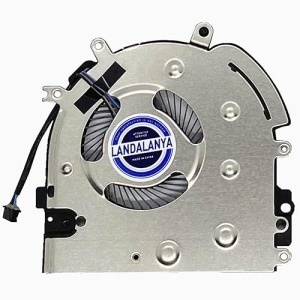
Laptop cooling fans are mechanical components that wear out with age and usage. A faulty fan may spin slowly, produce excessive noise, stop spinning completely, or operate intermittently.
When fans fail, heat quickly builds up inside the system.
Dried Thermal Paste
Thermal paste helps transfer heat from the processor and graphics chip to the heatsink.
Over time, thermal paste dries out and loses effectiveness. This reduces heat transfer efficiency and causes temperature increases.
Blocked Air Vents
Using a laptop on soft surfaces such as beds, blankets, couches, or pillows can block ventilation openings.
Restricted airflow significantly increases internal temperatures.
Intensive Workloads
Gaming, video editing, graphic design, engineering software, virtual machines, and heavy multitasking generate substantial heat.
If cooling systems are not functioning properly, temperatures can quickly exceed safe operating levels.
Malware and Background Processes
Viruses, malware, and unnecessary background programs can force processors to run continuously at high usage levels.
This increased workload generates additional heat and contributes to overheating.
Faulty Temperature Sensors
Temperature monitoring sensors help regulate fan speed and cooling performance.
When sensors fail, cooling fans may not operate correctly, resulting in excessive heat buildup.
Damaged Heatsinks or Heat Pipes
Physical damage to cooling components can reduce heat dissipation capabilities.
Bent heat pipes or damaged heatsinks often require replacement.
Signs Your Laptop Is Overheating
Recognizing overheating symptoms early can prevent major hardware failures.
Common warning signs include:
- Laptop becoming unusually hot
- Constant fan noise
- Loud fan operation
- Sudden shutdowns
- Frequent freezing
- Slow system performance
- Reduced battery life
- Screen lag
- Unexpected restarts
- Blue screen errors
- Burning smell
- Hot keyboard surface
- Hot bottom casing
If you notice any of these symptoms, professional diagnosis is recommended.
Risks of Ignoring Overheating Problems

Many users continue using overheating laptops until major failures occur.
Ignoring overheating issues can result in:
Processor Damage
Excessive temperatures can reduce CPU lifespan and affect overall system performance.
Graphics Chip Failure
High temperatures are one of the leading causes of GPU failure, especially in gaming laptops.
Motherboard Damage
Heat can damage motherboard components, voltage regulators, capacitors, and power circuits.
Battery Problems
Continuous exposure to heat accelerates battery wear and may cause battery swelling.
Storage Device Failure
Excessive temperatures can affect SSDs and hard drives, increasing the risk of data loss.
Unexpected Data Loss
Sudden shutdowns during work can result in file corruption and data loss.
Professional repair helps avoid these expensive consequences.
Our Laptop Cooling System Repair Services
At Luztech Computer Solutions, we provide comprehensive cooling system repair services for all major laptop brands.
Cooling Fan Repair
We diagnose noisy, slow, or non-functional cooling fans and restore proper operation.
Cooling Fan Replacement
When repair is not possible, we install quality compatible replacement fans.
Thermal Paste Replacement
We remove old thermal paste and apply high-quality thermal compounds to improve heat transfer efficiency.
Internal Cleaning
We perform deep cleaning of heatsinks, fans, ventilation channels, and internal components.
Heatsink Repair and Replacement
Damaged heatsinks are repaired or replaced to restore proper cooling performance.
Airflow Optimization
We inspect ventilation systems and ensure unrestricted airflow.
Temperature Diagnostics
Advanced diagnostic tools help identify abnormal temperature behavior and cooling inefficiencies.
Performance Testing
After repair, we perform stress testing to verify stable operating temperatures.
Laptop Brands We Support

We provide laptop cooling system and overheating repair services for:
HP Laptop Cooling Repair
- HP Pavilion
- HP EliteBook
- HP ProBook
- HP Envy
- HP Spectre
- HP Omen
Dell Laptop Cooling Repair
- Dell Latitude
- Dell Inspiron
- Dell Vostro
- Dell Precision
- Dell XPS
Lenovo Laptop Cooling Repair
- ThinkPad
- ThinkBook
- IdeaPad
- Yoga
- Legion
Asus Laptop Cooling Repair
- ZenBook
- VivoBook
- ExpertBook
- TUF Gaming
- ROG Gaming
Acer Laptop Cooling Repair
- Aspire
- Swift
- Nitro
- Predator
Apple MacBook Cooling Repair
- MacBook Air
- MacBook Pro
Microsoft Surface Cooling Repair
- Surface Laptop
- Surface Pro
- Surface Book
Other Brands
- Samsung
- MSI
- Gigabyte
- Razer
- Toshiba
Benefits of Professional Cooling System Repair
Professional cooling system repair provides many advantages:
- Improved performance
- Lower operating temperatures
- Reduced fan noise
- Better system stability
- Longer hardware lifespan
- Improved battery performance
- Reduced risk of motherboard damage
- Enhanced gaming performance
- Prevention of unexpected shutdowns
Laptop Cooling System Repair Cost in Nairobi
Repair costs vary depending on:
- Laptop model
- Cooling fan condition
- Thermal paste requirements
- Internal cleaning needs
- Replacement parts required
After diagnostics, our technicians provide a clear repair quotation before work begins.
Why Choose Luztech Computer Solutions?
Luztech Computer Solutions is trusted by students, professionals, businesses, and institutions across Kenya.
Reasons customers choose us include:
- Experienced laptop repair technicians
- Advanced diagnostic equipment
- Quality replacement parts
- Fast turnaround times
- Affordable repair solutions
- Support for all major laptop brands
- Professional customer service
- Countrywide repair support
Frequently Asked Questions
Why is my laptop overheating?
Overheating is commonly caused by dust buildup, faulty fans, dried thermal paste, blocked air vents, or intensive workloads.
Can overheating damage my laptop?
Yes. Prolonged overheating can damage the processor, graphics chip, motherboard, battery, and storage devices.
How often should a laptop be cleaned?
Most laptops benefit from professional internal cleaning every 6 to 12 months depending on usage conditions.
Can thermal paste replacement reduce temperatures?
Yes. Replacing old thermal paste often significantly improves heat transfer and cooling efficiency.
Do you repair gaming laptop overheating issues?
Yes. We repair overheating problems on gaming laptops from MSI, Asus ROG, Acer Predator, Lenovo Legion, HP Omen, Dell G Series, and other gaming brands.
Do you support customers outside Nairobi?
Yes. We provide countrywide repair support services across Kenya.
Professional Laptop Cooling System & Overheating Problem Repair in Nairobi
If your laptop is running hot, slowing down, producing excessive fan noise, or shutting down unexpectedly, Luztech Computer Solutions provides professional laptop cooling system and overheating problem repair services in Nairobi. Our experienced technicians diagnose the root cause of overheating and provide reliable solutions that restore performance, improve cooling efficiency, and protect your laptop from costly hardware damage.
